21genX: Curated Chronicles
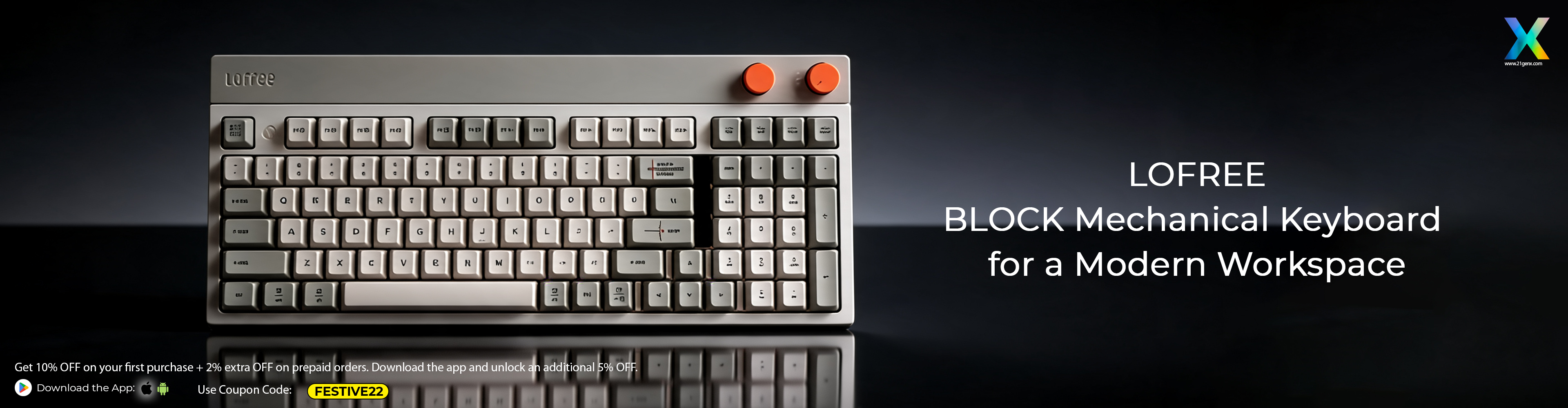
Lofree Block Mechanical Keyboard for a Modern Workspace
A keyboard is essential in any computer setup, whether you use it for office work, writing, studying, or creative projects. The right keyboard can make everyday tasks more comfortable while adding a distinctive look to your workspace. The LOFREE BLOCK Mechanical Keyboard is a strong option for users who want a wireless mechanical keyboard with a design that complements a modern desk setup. Whether you are upgrading your home office, organising a creative workstation, or refreshing your everyday computer accessories, choosing a keyboard that suits your needs is important.
The LOFREE BLOCK keyboard is available in two listed variants: Keyboard Only and Keyboard + Mouse. These options let you decide whether you need a standalone keyboard or a combo that includes a mouse. For people searching for the LOFREE BLOCK mechanical keyboard, LOFREE BLOCK wireless keyboard, or LOFREE wireless mechanical keyboard in India, understanding the available variants, everyday usability, connectivity requirements, and compatibility can help make the selection process easier.
Available through 21GenX, the LOFREE BLOCK mechanical keyboard is worth considering for users who value functional computer accessories and a personalised workspace.
LOFREE BLOCK Mechanical Keyboard Overview
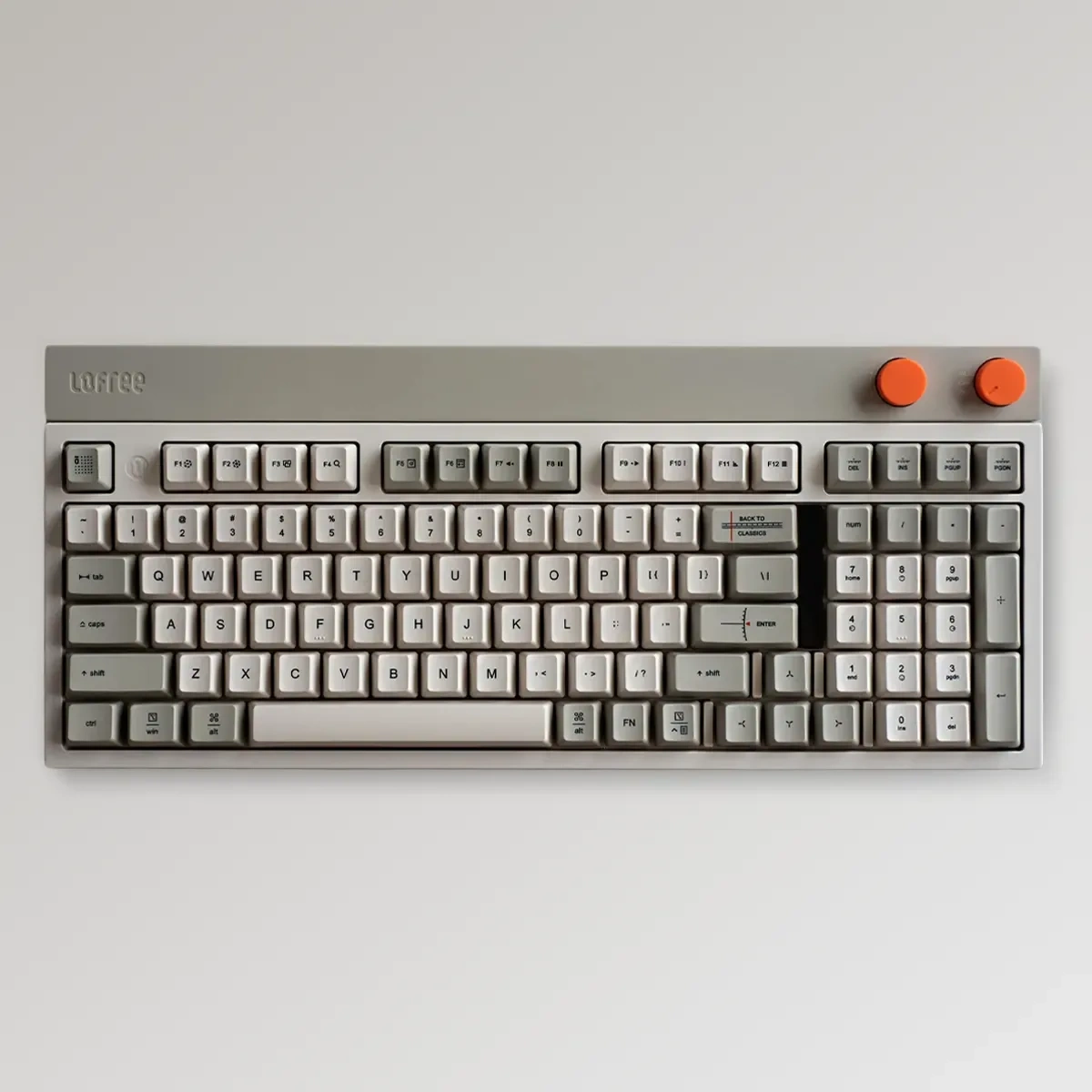
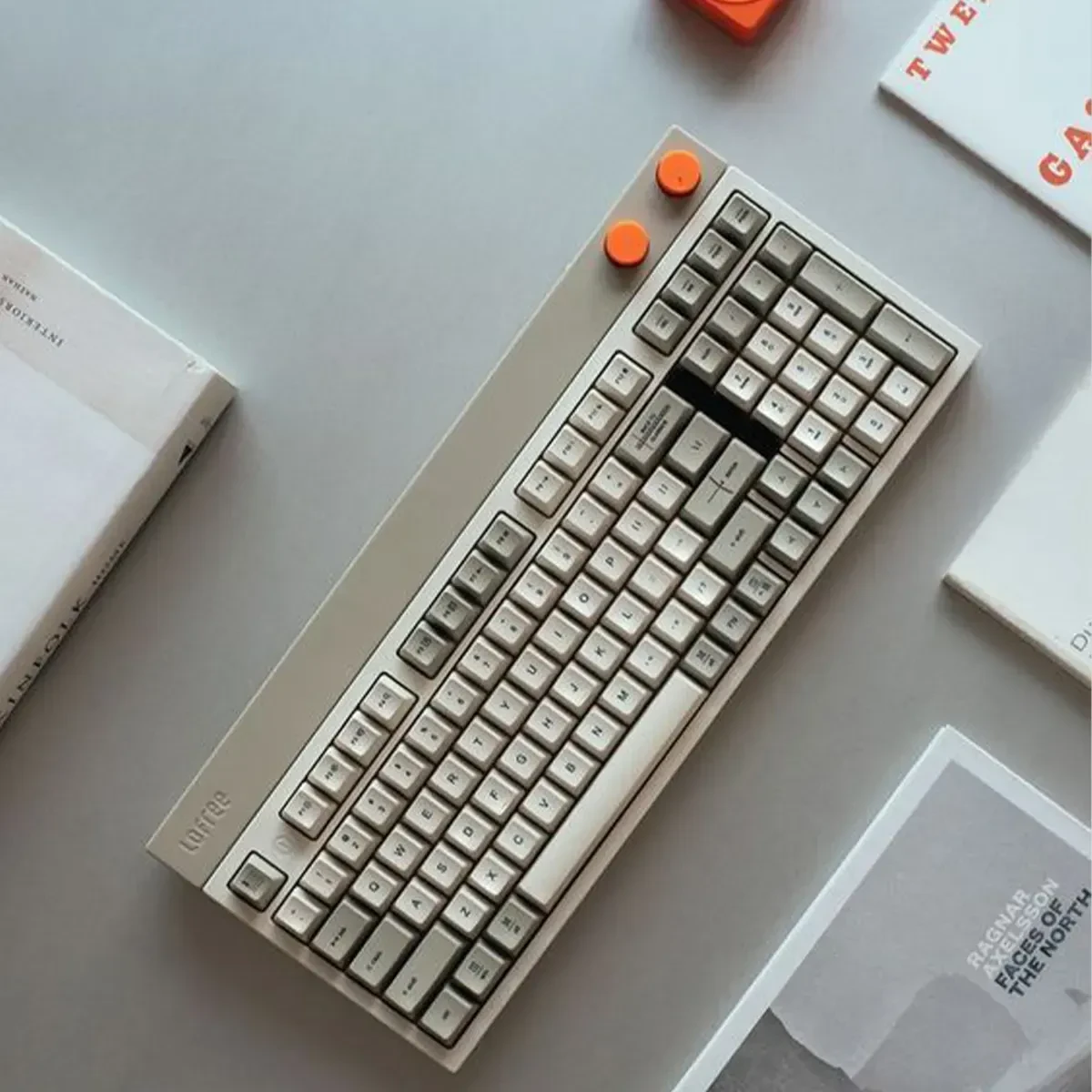
The LOFREE BLOCK Mechanical Keyboard is designed for users exploring mechanical keyboards for everyday computer use. Its wireless design makes it relevant for people looking for alternatives to conventional wired keyboard setups. The product offers two purchase configurations. The Keyboard Only option is for users who need the keyboard, while the Keyboard + Mouse option suits those looking for a combined input-device setup.
Your choice depends on your existing accessories, workspace needs, and preferred way of working.
Specification --------------- Details
Brand ---------------- LOFREE
Product Name ----------------- BLOCK Wireless Mechanical Keyboard
Keyboard Layout -------------- 98 keys
Switch Type ----------------- LOFREE × TTC Full POM linear switches
Keycap Material ---------------- Dye-sublimated PBT
Connectivity --------------- Bluetooth 5.0, 2.4GHz wireless, USB-C wired
Backlighting ------------------ White LED with 14 lighting effects
Hot-Swappable Switches ------------------- Yes
Control Knobs --------------- Two retro-style knobs
Display ----------------- Visual display for connection mode and battery status
Battery Capacity ------------------- 2000mAh
Advertised Working Time -------------- Up to 80 hours
Adjustable Typing Angle ------------------ 4° and 8°
Compatible Systems ------------------ Windows, macOS, Android, iOS and iPadOS
Available Variants ---------------- Keyboard Only and Keyboard + Mouse
Specifications are based on the manufacturer's product information. Confirm the exact package contents and compatibility details for your selected variant.

What Makes the LOFREE BLOCK Wireless Mechanical Keyboard Stand Out?
1. Classical Design with a Modern Touch
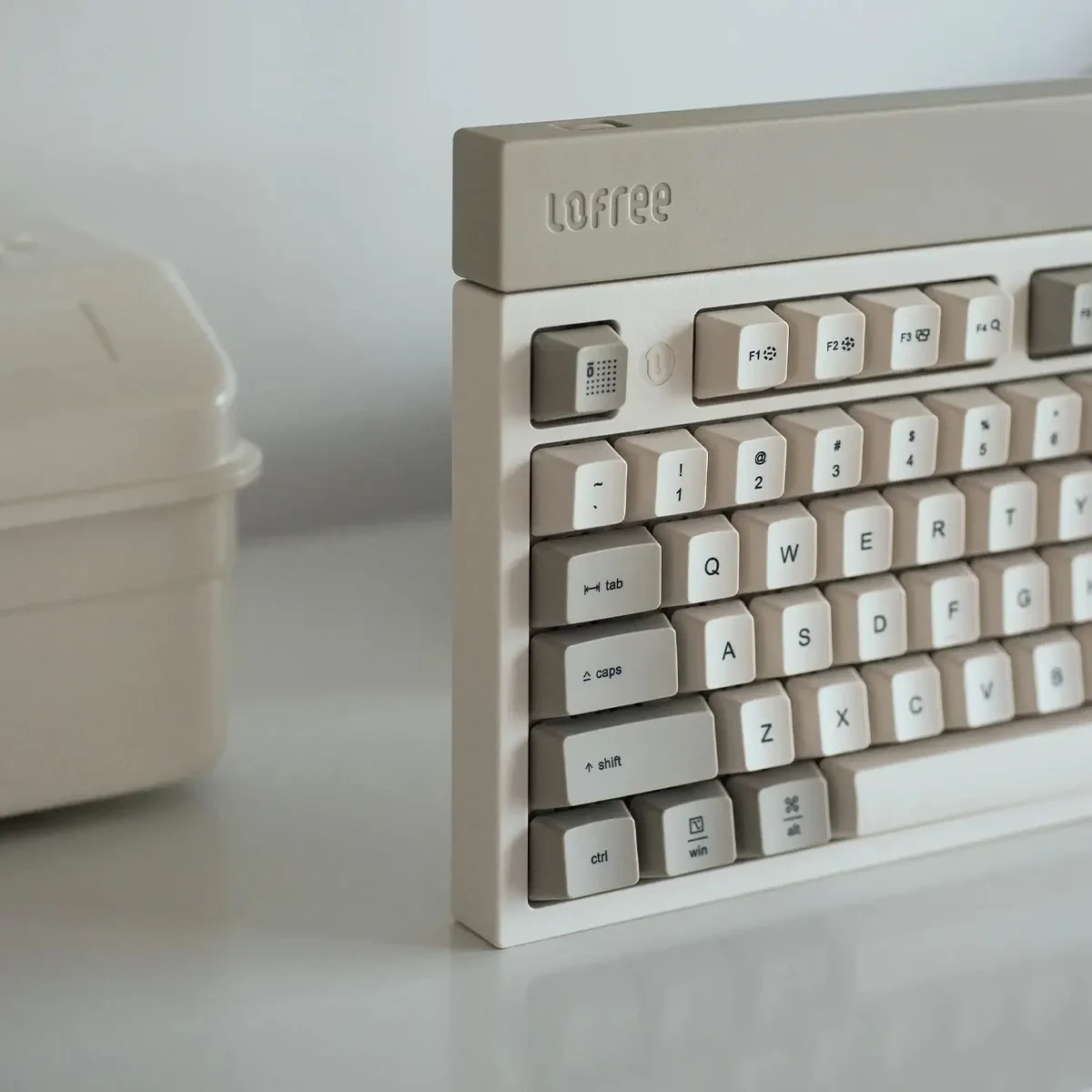
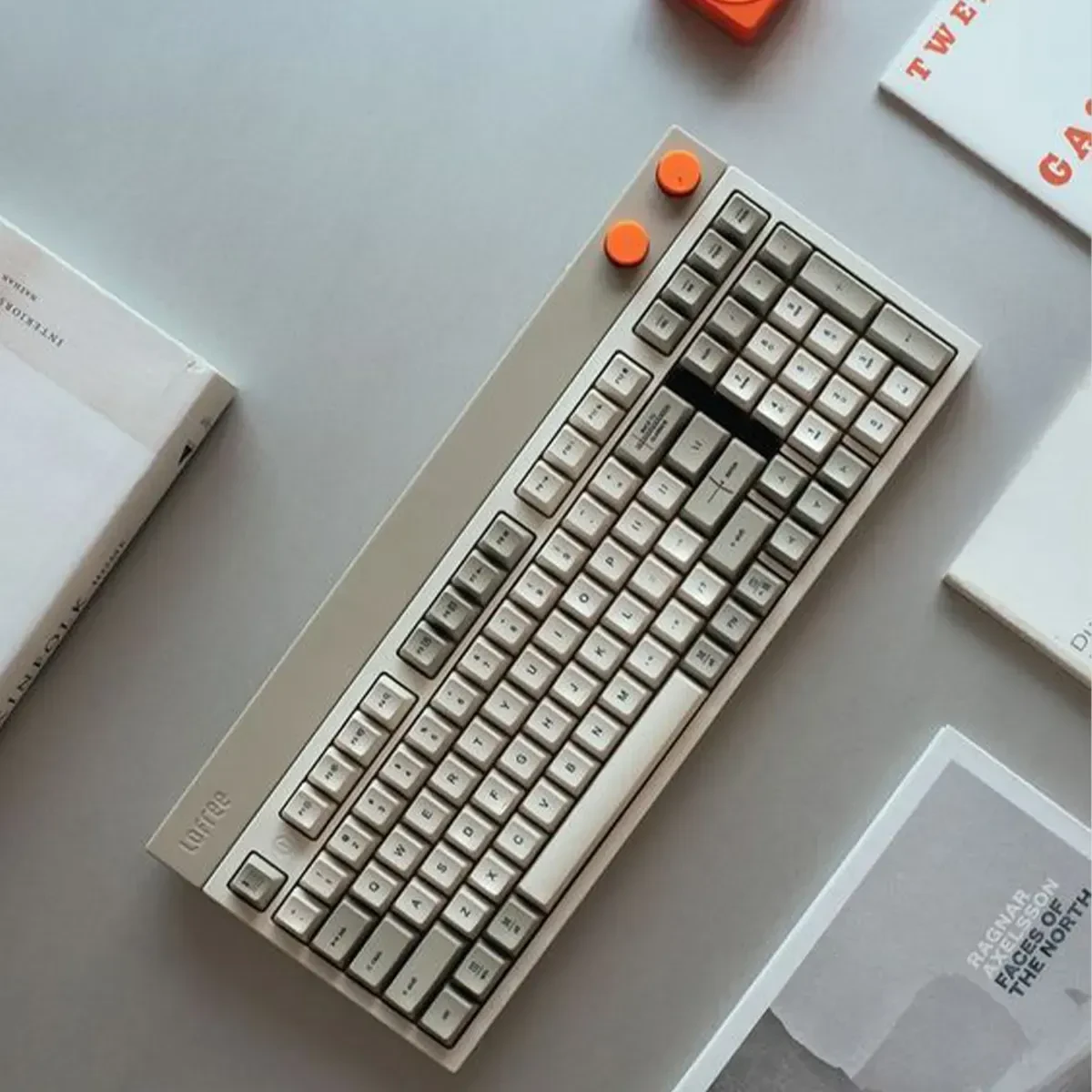
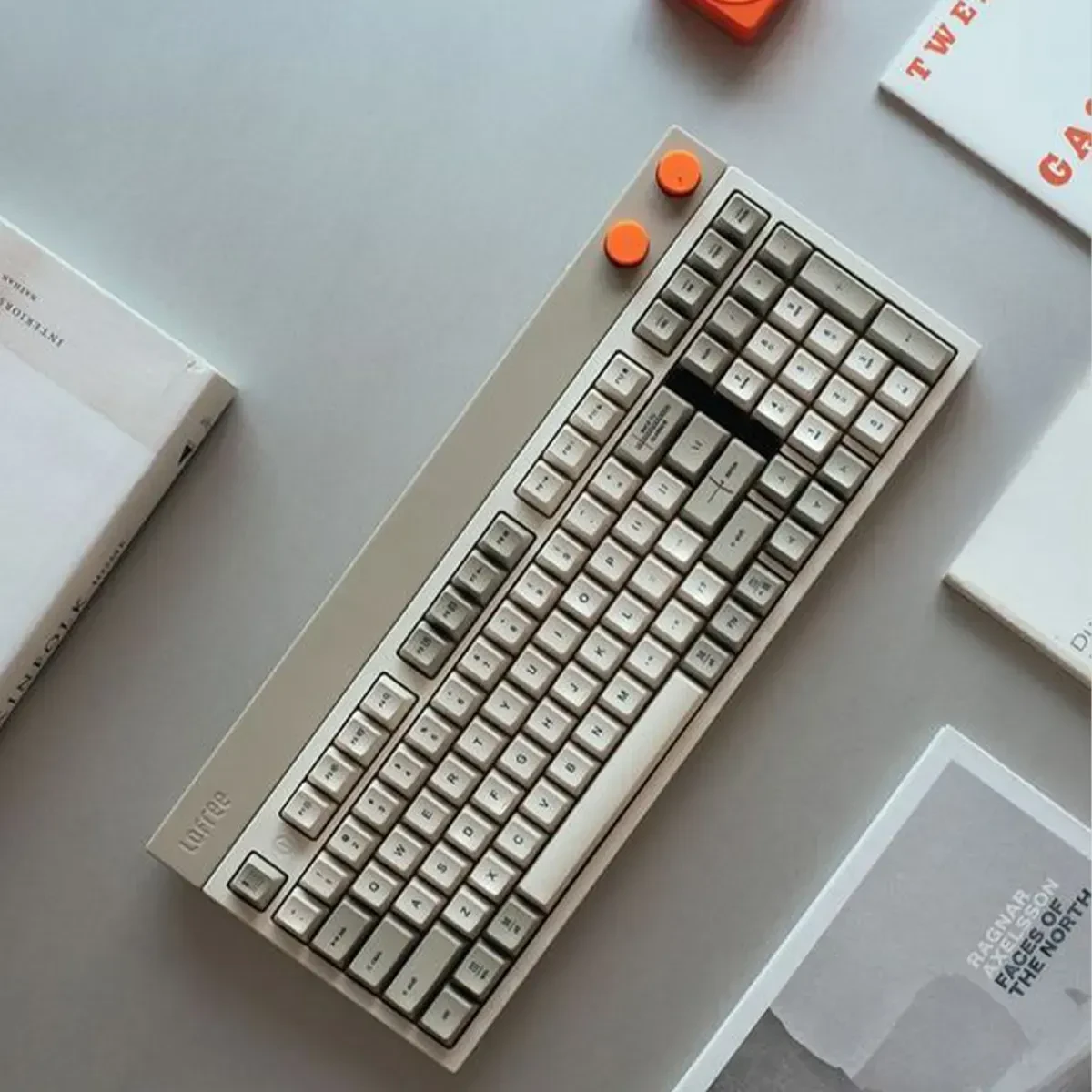
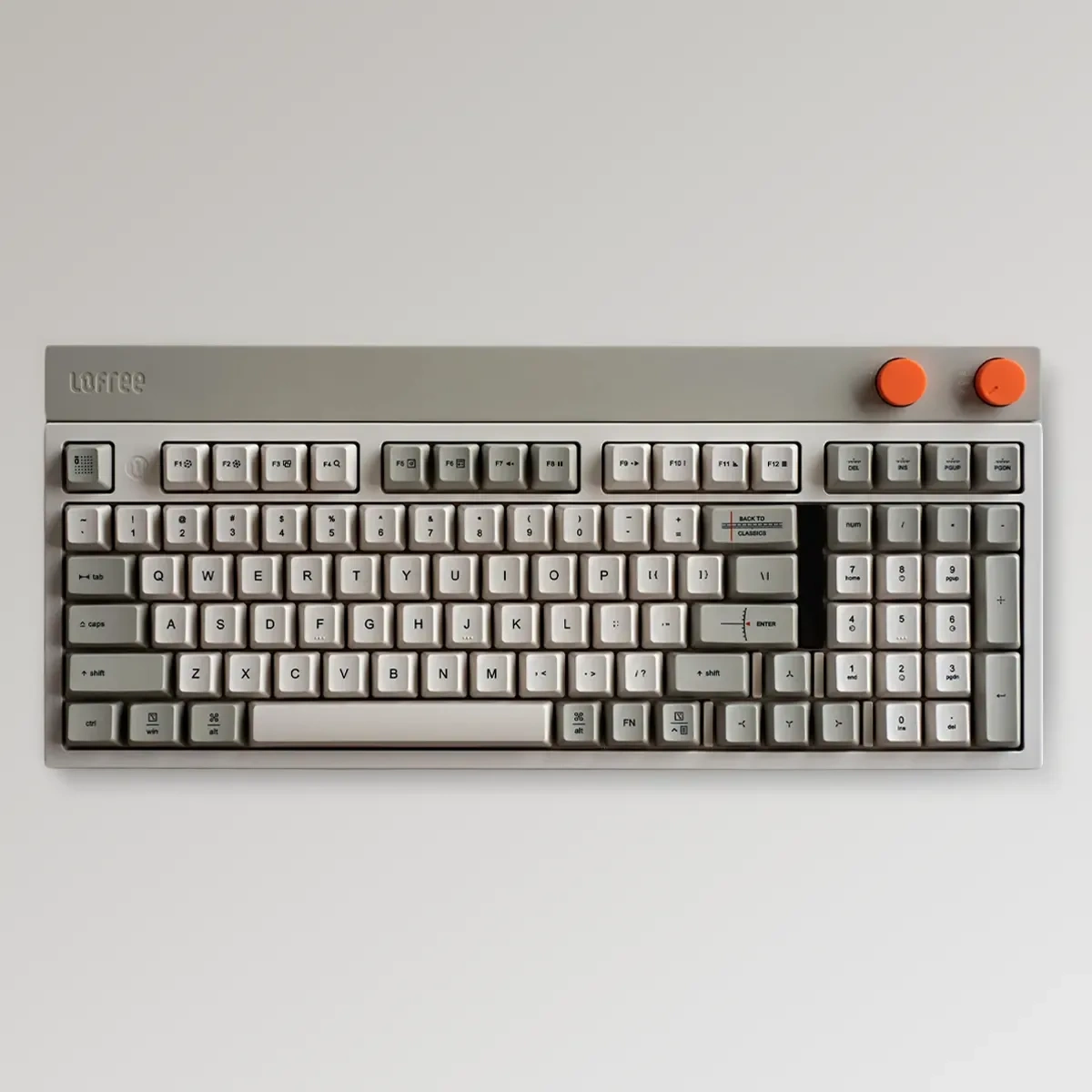
The LOFREE BLOCK mechanical keyboard combines a classical design approach with practical features for modern computer setups. Its soft grey base, warm orange accents, and block-shaped keycaps create a distinctive look that sets it apart from many conventional keyboards.
The design can complement a home office, creative workstation, or personal desk setup. Its understated base colour makes it suitable for users who prefer neutral accessories, while the orange accents add visual interest. For people looking for the LOFREE BLOCK keyboard in India, consider its design alongside its connectivity, typing features, and layout. A keyboard sits prominently on most desks, so choosing one that fits your preferred aesthetic can help create a more coordinated workspace.
2. Full POM Linear Switches for Smooth Typing
Switches play an important role in the overall mechanical keyboard experience. They affect how keys move, how much force it takes to register a keystroke, and the feedback users feel while typing. The LOFREE BLOCK features custom Full POM linear switches developed with TTC. Linear switches provide a smooth keystroke without the pronounced tactile bump associated with tactile switches.
The manufacturer's specifications list an actuation force of approximately 43gf and a bottom-out force of approximately 50gf. These characteristics may appeal to users who prefer a consistent linear typing experience. Writers, professionals, students, and content creators can consider this switch type when choosing a keyboard for everyday typing. However, typing comfort is subjective. Your preferred switch type, typing technique, and working environment should all influence your decision.
3. Gasket-Mount Construction for a Refined Typing Experience
The keyboard's construction is another factor worth considering when comparing mechanical keyboards. The LOFREE BLOCK uses a gasket-mount design with Poron foam. This construction helps isolate the keyboard's internal components and reduce vibrations, contributing to its intended typing feel.
For users who spend extended periods typing, overall keyboard construction can matter as much as switch type and keycap material. The gasket-mount design complements the linear switches and PBT keycaps, creating a combination of components intended to support a consistent typing experience. If you are comparing the LOFREE BLOCK wireless keyboard with other mechanical keyboards, consider the mounting structure alongside the switch specifications and your personal preferences.
4. Three Connectivity Options for Everyday Flexibility
Connectivity matters for people who use multiple devices or prefer to keep their desks free of unnecessary cables.
The LOFREE BLOCK supports three connection modes:
- Bluetooth 5.0: For compatible devices that support Bluetooth connectivity.
- 2.4GHz wireless: For a wireless connection using the supported receiver.
- USB-C wired: For users who prefer a direct wired connection.
The keyboard also supports Bluetooth connections to up to three devices. Its mode-control knob makes switching between supported connection modes more convenient. This flexibility can help people who work across compatible computers, tablets, or other devices. It also lets users choose between wired and wireless operation based on their needs. Before purchasing, verify that your intended device supports the connection method you plan to use.
5. Two Retro-Style Knobs for Convenient Controls
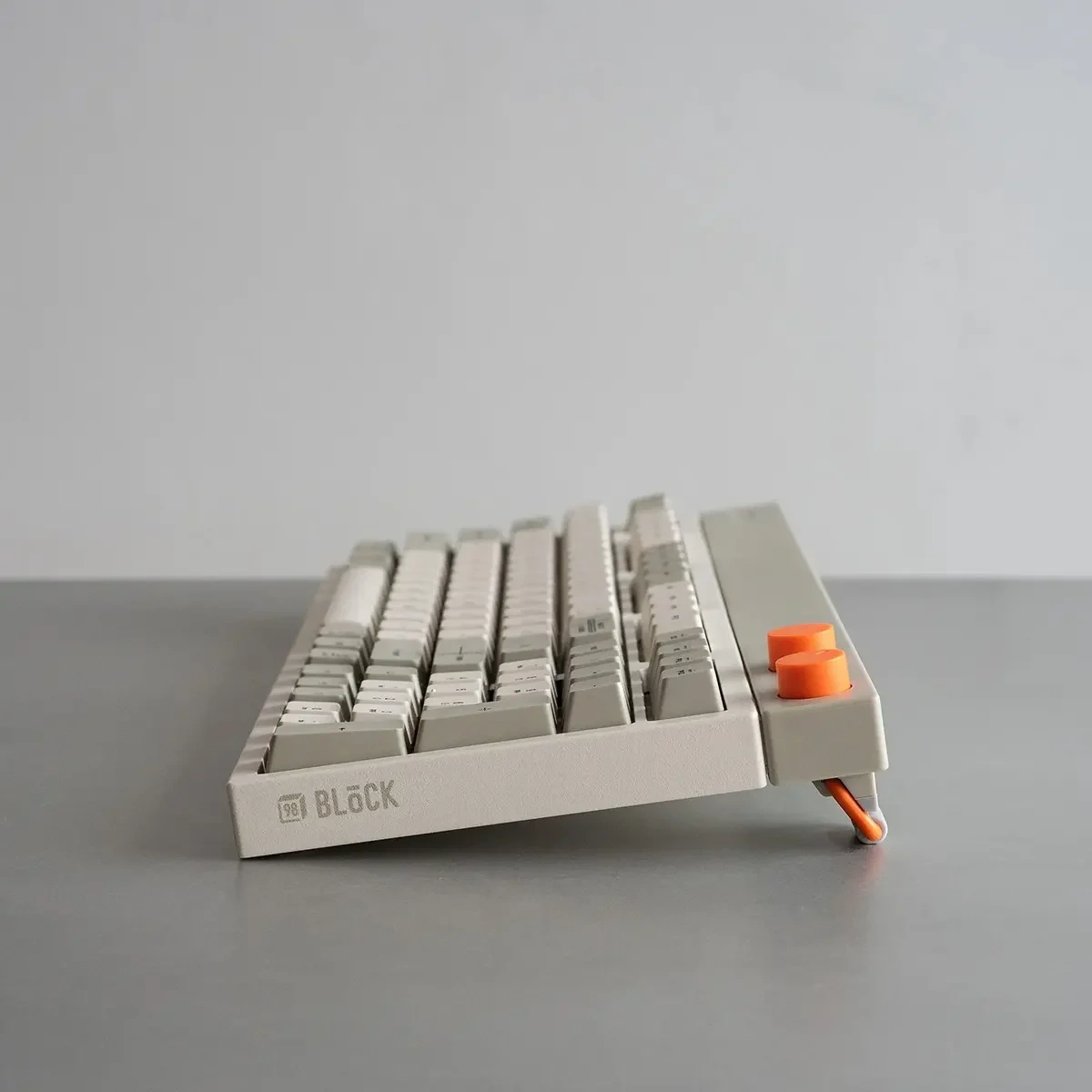
The LOFREE BLOCK includes two retro-style control knobs that combine practical functionality with its classical design. One knob adjusts volume, while the other controls connection modes. These dedicated controls let you access selected functions without relying entirely on keyboard shortcuts.
For users who regularly switch between applications, adjust audio levels, or work across multiple connected devices, these dedicated controls can be a useful addition.
The knobs also contribute to the product's overall appearance, reinforcing its combination of retro-inspired styling and modern functionality. This feature makes the LOFREE BLOCK worth considering for people who prefer keyboards with distinctive physical controls.
6. White LED Backlighting with 14 Lighting Effects
Keyboard backlighting can improve a workstation's appearance and illuminate the keys. The LOFREE BLOCK features white LED backlighting with 14 lighting effects. This gives users different lighting options while maintaining a consistent white-light colour scheme.
The backlighting complements the keyboard's neutral base and contrasting accents, making it suitable for a range of workspace styles. Users can explore the available lighting effects to find an appearance that suits their preferences. Those who prefer a more restrained setup may appreciate the white lighting instead of multicolour RGB effects. If keyboard illumination is an important consideration for your setup, review the product specifications and available controls before making your decision.
7. PBT Keycaps for Everyday Use
Keycap material affects a keyboard's surface feel, appearance, and long-term wear characteristics. The LOFREE BLOCK uses dye-sublimated PBT keycaps. PBT is commonly used in mechanical keyboards because it's durable and resists developing a shiny appearance with regular handling.
Dye sublimation is a printing method that incorporates dye into a suitable material, making it ideal for the legends and designs on keycaps. For users who spend several hours typing, these characteristics are worth considering alongside the switch type, layout, and keyboard construction. The combination of PBT keycaps and linear mechanical switches gives the LOFREE BLOCK a feature set that may appeal to users who value both design and everyday usability.
8. Hot-Swappable Switches for Customisation
Mechanical keyboard enthusiasts often enjoy adjusting their keyboards to suit their preferences. Switch customisation is one way to explore different typing characteristics. The LOFREE BLOCK supports hot-swappable switches, letting users replace compatible switches without soldering. The manufacturer's product information identifies the keyboard as hot-swappable and specifies MX-compatible switch stems.
This feature can help users maintain their keyboard or explore compatible replacement switches.
However, switch compatibility should always be checked before making changes. Confirm the supported switch type and pin configuration, and follow the manufacturer's instructions when removing or installing switches. For users who value customisation, hot-swappable support adds flexibility to the LOFREE BLOCK mechanical keyboard.
9. Built-In Display for Connection and Battery Information
Tracking a wireless keyboard's connection mode and battery status can be useful, especially when switching between devices. The LOFREE BLOCK includes a small visual display that shows information such as connection mode and battery status.
This feature lets users check key keyboard information without relying solely on external software or indicators. For a wireless mechanical keyboard, visible status information can help make everyday operation more straightforward. It also complements the dedicated mode-control knob by combining physical controls with visual feedback.
10. Rechargeable Battery for Wireless Operation
Battery capacity and operating time matter when choosing a wireless keyboard. The LOFREE BLOCK has a built-in 2000mAh rechargeable battery. The manufacturer advertises up to 80 hours of use, though actual battery life can vary depending on usage and lighting settings.
The keyboard charges through USB-C, which is also its wired connection option.
For users who prefer wireless peripherals, a rechargeable battery can help reduce the need for disposable batteries. Checking the battery specs and charging requirements can help you understand how the keyboard fits into your routine. If you frequently use backlighting or switch between connection modes, remember that actual battery performance may differ from the advertised maximum.
11. Adjustable Typing Angles
Keyboard positioning can affect comfort during extended typing sessions. The LOFREE BLOCK includes foldable risers that allow users to adjust the typing angle between 4° and 8°.
This lets you adjust the keyboard's tilt to suit your preferences and desk setup.
The most comfortable position depends on factors such as chair height, desk height, keyboard placement, and wrist positioning. Adjusting the keyboard angle can help create a more suitable workstation. Users who spend long periods typing should consider their overall desk ergonomics rather than relying on keyboard features alone.
Choosing Between the LOFREE BLOCK Keyboard Only and Keyboard + Mouse Variants
The LOFREE BLOCK is available in two variants: Keyboard Only and Keyboard + Mouse. The right option depends on the accessories you already own and whether you want a combined input-device setup.
Comparison Point ------------- Keyboard Only -------------- Keyboard + Mouse
Main inclusion -------------- LOFREE BLOCK keyboard -------------- LOFREE BLOCK keyboard and mouse combination
Suitable for ---------------- Users who already have a mouse or only need a keyboard --------------- Users looking for a combined keyboard and mouse setup
Existing accessories --------------- Can be paired with a compatible mouse you already own --------------- May provide a coordinated alternative to buying devices separately
Main consideration -------------- Check the keyboard's features and compatibility --------------- Confirm the package contents and mouse specifications
Before purchasing --------------- Verify the selected keyboard variant --------------- Verify the keyboard and included mouse details
Keyboard Only
The Keyboard Only variant may be suitable if you already own a mouse that meets your requirements. This option lets you focus on the keyboard's design, mechanical switches, connectivity, and other features without replacing your existing mouse.
It may also be worth considering if you are upgrading a specific part of your workstation rather than purchasing a complete set of peripherals. Before selecting this variant, confirm the keyboard specifications and compatibility with your intended devices.
Keyboard + Mouse
The Keyboard + Mouse variant is worth exploring if you want a keyboard and mouse combination. A combined set may simplify selecting compatible peripherals for a workspace. It can also be useful when setting up a new desk or replacing multiple accessories at once.
Before choosing this option, check the exact mouse model, its connectivity, compatibility, charging requirements, and package contents on the product listing. The best choice depends on whether you need a mouse and whether the included model meets your everyday requirements.
Who Should Consider the LOFREE BLOCK Mechanical Keyboard?
The LOFREE BLOCK wireless mechanical keyboard may appeal to different users depending on their typing habits, workspace requirements, and preferred design.
For Professionals and Office Users
Professionals use keyboards to write documents, prepare presentations, respond to emails, manage spreadsheets, and work across applications. The LOFREE BLOCK combines mechanical switches with three connection modes and dedicated control knobs. These features may suit people who want a keyboard that handles a range of everyday work tasks.
Its classical design can also complement a home office or professional workstation. However, users should consider their preferred typing feel, available desk space, and device compatibility before choosing a keyboard.
For Writers and Content Creators
Writers, editors, content marketers, and other content creators rely on keyboards all day. The LOFREE BLOCK's linear switches deliver smooth keystrokes, while its PBT keycaps and gasket-mount construction enhance the overall typing experience.
Its wireless connectivity also helps people who work across compatible devices. For content creators who want a keyboard that combines practical features with a distinctive appearance, the LOFREE BLOCK is worth exploring.
For Students
Students use keyboards for assignments, research, presentations, online learning, and personal projects. The LOFREE BLOCK offers multiple connection options, so students can consider how it fits into their computer setup.
Its adjustable typing angle and rechargeable battery are additional features to evaluate when selecting a keyboard for regular use. Students should also consider their available desk space, compatibility requirements, and whether the Keyboard Only or Keyboard + Mouse variant better suits their needs.
For Mechanical Keyboard Enthusiasts
Mechanical keyboard enthusiasts often look beyond basic functionality when choosing a keyboard. Switch construction, keycap material, mounting design, connectivity, and customisation options can all influence their decision. The LOFREE BLOCK combines Full POM linear switches, dye-sublimated PBT keycaps, a gasket-mount design, and hot-swappable support.
Its two control knobs, visual display, and multiple connection modes provide additional features to consider. For users interested in a mechanical keyboard that combines customisation options with a distinctive design, the BLOCK is worth evaluating.
For Minimalist Workspace Enthusiasts
A well-coordinated desk setup often relies on a balance between functionality and visual consistency. The LOFREE BLOCK's soft grey base and warm orange accents provide an alternative to conventional black keyboards. Its classic design complements a variety of desk accessories and workspace styles.
Users who prefer a clean and organised setup may also appreciate the choice between wireless and wired connectivity. Consider how the keyboard's size, colour scheme, and included accessories will fit your desk before purchasing.
For Multi-Device Users
Some people regularly work across multiple devices, such as a computer, tablet, or compatible mobile device. The LOFREE BLOCK supports Bluetooth, 2.4GHz wireless, and USB-C wired connections. Bluetooth supports up to three connected devices, and the mode-control knob lets users switch between supported connection modes.
This flexibility may help users manage different devices with one keyboard. Check the operating system and connection requirements of each intended device to ensure compatibility.
For Users Setting Up a New Workspace
Setting up a new workstation often means choosing a keyboard, mouse, and other computer accessories. The Keyboard + Mouse variant may be worth considering for users who want to explore a combined setup. If you already own a suitable mouse, consider the Keyboard Only option. Evaluating your existing equipment before choosing a variant can help you select the configuration that best fits your needs.
LOFREE BLOCK Wireless Mechanical Keyboard vs Conventional Keyboards
When comparing the LOFREE BLOCK with other keyboards, consider its connectivity, switch type, construction, customisation options, and physical controls.
Comparison Point ------------ LOFREE BLOCK -------------- What to Consider with Other Keyboards
Keyboard type ------------- Mechanical ----------------- Compare mechanical and non-mechanical options
Layout ----------- 98 keys --------------- Choose a layout suited to your typing needs
Switches --------------- Full POM linear switches ------------- Compare linear, tactile, and clicky switches
Connectivity ----------- Bluetooth, 2.4GHz wireless, USB-C ------------- Check supported connection methods
Keycap material --------------- Dye-sublimated PBT --------------- Compare materials and printing methods
Backlighting ----------------- White LED with 14 effects --------------- Review available lighting options
Switch customisation --------------- Hot-swappable ---------------- Check switch replacement support
Physical controls --------------- Two control knobs ------------------ Consider dedicated controls and shortcuts
Display ----------------- Connection mode and battery status --------------- Check available status indicators
Keyboard angle --------------- Adjustable between 4° and 8° ---------------- Compare ergonomic adjustment options
Purchase variants -------------- Keyboard Only and Keyboard + Mouse ------------ Select the accessories you need
The right keyboard depends on your priorities. Some users may prefer a compact design or a different switch type, while others may value wireless connectivity, hot-swappable switches, and dedicated controls.
Compare the specifications with your requirements before deciding.
How to Choose a Wireless Mechanical Keyboard
Choosing a wireless mechanical keyboard involves more than comparing designs. Consider how you work, which devices you use, and which features matter most to your everyday experience.
1. Choose a Suitable Keyboard Layout
Keyboard layouts vary in size and key arrangement. The LOFREE BLOCK features a 98-key layout with a dedicated numeric keypad alongside the main typing keys. This layout may suit users who want a relatively space-conscious design while keeping dedicated numeric keys. Consider whether you regularly use a numeric keypad, dedicated function keys, and arrow keys before choosing a layout.
2. Understand the Switch Type
Mechanical switches influence the feel and sound of typing. The LOFREE BLOCK uses linear Full POM switches. Linear switches move without a pronounced tactile bump, which may appeal to users who prefer a smooth keystroke. If you are accustomed to tactile or clicky switches, consider your typing preferences before selecting a linear keyboard.
3. Review Connectivity Requirements
Wireless keyboards can use Bluetooth or a dedicated wireless receiver, and some models also support wired connections. The LOFREE BLOCK supports Bluetooth 5.0, 2.4GHz wireless, and USB-C wired connectivity. Consider which connection methods your devices support and whether you need to switch between multiple devices.
4. Consider Battery Capacity
A rechargeable battery is an important feature of a wireless keyboard. The LOFREE BLOCK features a 2000mAh battery with an advertised working time of up to 80 hours. Actual battery life depends on usage and lighting settings, so consider your daily usage habits and charging preferences.
5. Check the Keycap Material
Keycaps affect a keyboard's surface feel and appearance. The LOFREE BLOCK uses dye-sublimated PBT keycaps. When evaluating different keyboards, compare the material, printing method, and surface characteristics.
6. Look at Customisation Options
Some users prefer keyboards that allow them to replace switches or make other adjustments. The LOFREE BLOCK supports hot-swappable switches, which can be useful for people interested in customising their typing experience. Check the supported switch types and pin configurations before purchasing replacement switches.
7. Consider Desk Space and Ergonomics
The keyboard's dimensions and angle can affect how it fits into your workspace. The LOFREE BLOCK measures approximately 387 × 165 × 40.5 mm and weighs approximately 1.09 kg. Its adjustable risers support typing angles of 4° and 8°. Check your available desk space and consider where you'll place your mouse, monitor, and other accessories when planning your setup.
8. Choose the Right Variant
If you already own a suitable mouse, the Keyboard Only variant may meet your needs. If you want to explore a combined keyboard and mouse setup, consider the Keyboard + Mouse variant and check the included mouse specifications. Choosing the right variant helps ensure the configuration matches your needs.
How to Maintain Your LOFREE BLOCK Mechanical Keyboard
Regular maintenance can help preserve your keyboard's appearance and functionality.
Remove dust regularly:
Use a soft brush or suitable cleaning tool to clean around the keys.
Clean the keycaps carefully:
Use a suitable soft cloth and follow the manufacturer's recommendations.
Avoid liquid spills:
Keep food and drinks away from the keyboard and its electronic components.
Use the correct cleaning products:
Avoid harsh chemicals that may damage the keycaps or keyboard surface.
Keep the keyboard dry:
Keep it away from excessive moisture.
Charge the battery appropriately:
Follow the manufacturer's instructions for USB-C charging.
Handle switches carefully:
If replacing switches, follow the manufacturer's instructions and use compatible components. Keep the connection ports clean: Prevent dust and debris from accumulating around the USB-C port.
Store the keyboard safely:
Protect it from impacts, excessive heat, and other conditions that may damage its components.
Follow the user manual:
Refer to the manufacturer's guidance for cleaning, charging, connectivity, and maintenance.
These practices can help keep the keyboard in good condition for everyday use.
Why Consider the LOFREE BLOCK Keyboard from 21GenX?
21GenX offers technology and lifestyle products for customers looking to explore distinctive accessories for modern workspaces. The LOFREE BLOCK mechanical keyboard is worth considering if you want wireless connectivity, mechanical switches, and a design that blends classic styling with modern controls.
The two available variants also let you decide whether you need the keyboard alone or a keyboard-and-mouse combo.
21GenX lists the following shopping benefits:
- Free shipping across India
- Extra 2% off on prepaid orders
- Easy exchange and hassle-free returns
- Authentic products guaranteed
- 100% secure payments and trusted checkout
Check the current product listing for variant availability, delivery details, and applicable purchase terms.
FAQ
Q. What is the LOFREE BLOCK mechanical keyboard?
A. The LOFREE BLOCK is a wireless mechanical keyboard featuring a 98-key layout, Full POM linear switches, PBT keycaps, a gasket-mount design, two control knobs, and three connection modes.
Q. Is the LOFREE BLOCK keyboard available in India?
A. You can explore the LOFREE BLOCK mechanical keyboard through its product listing on 21GenX. Check the current listing for availability, delivery information, and the available variants.
Q. What makes the LOFREE BLOCK wireless keyboard different?
A. Its features include a classical design, two retro-style control knobs, a visual display for connection and battery information, hot-swappable switches, white LED backlighting, and support for Bluetooth, 2.4GHz wireless, and USB-C wired connectivity.
Q. What switch type does the LOFREE BLOCK use?
A. The keyboard uses LOFREE × TTC Full POM linear switches. The manufacturer's listed specifications include an actuation force of approximately 43 gf and a bottom-out force of approximately 50 gf.
Q. Does the LOFREE BLOCK support wireless connectivity?
A. Yes. The keyboard supports Bluetooth 5.0 and 2.4GHz wireless connectivity. It also supports a wired USB-C connection.
Q. Can the LOFREE BLOCK connect to multiple devices?
A. The keyboard supports Bluetooth connections with up to three devices. Its mode-control knob helps users switch between supported connection modes.
Check the manufacturer's instructions for details on pairing and switching devices.
Q. Does the LOFREE BLOCK have backlighting?
A. Yes. It features white LED backlighting with 14 lighting effects.
Final Thoughts
The LOFREE BLOCK Mechanical Keyboard blends classic styling with features built for everyday computer use. Its 98-key layout, Full POM linear switches, PBT keycaps, gasket-mount construction, and hot-swappable support make it worth exploring for users who value both functionality and design. Its three connection modes offer flexibility across devices, while the two control knobs and built-in display provide convenient access to selected functions. The adjustable typing angles and rechargeable battery add further details to consider when evaluating the keyboard for your workspace.
The Keyboard Only and Keyboard + Mouse variants provide options for different setup requirements. Whether you are upgrading a home office, creating a dedicated writing space, organising a workstation, or exploring mechanical keyboards, choose the configuration that best matches your needs. For anyone searching for the LOFREE BLOCK mechanical keyboard, LOFREE BLOCK keyboard in India, LOFREE BLOCK wireless keyboard, or LOFREE wireless mechanical keyboard in India, the product is worth considering for its combination of connectivity, customisation options, and distinctive design.
Before purchasing, review the current specifications, confirm device compatibility, and select the appropriate variant for your setup.