21genX: Curated Chronicles
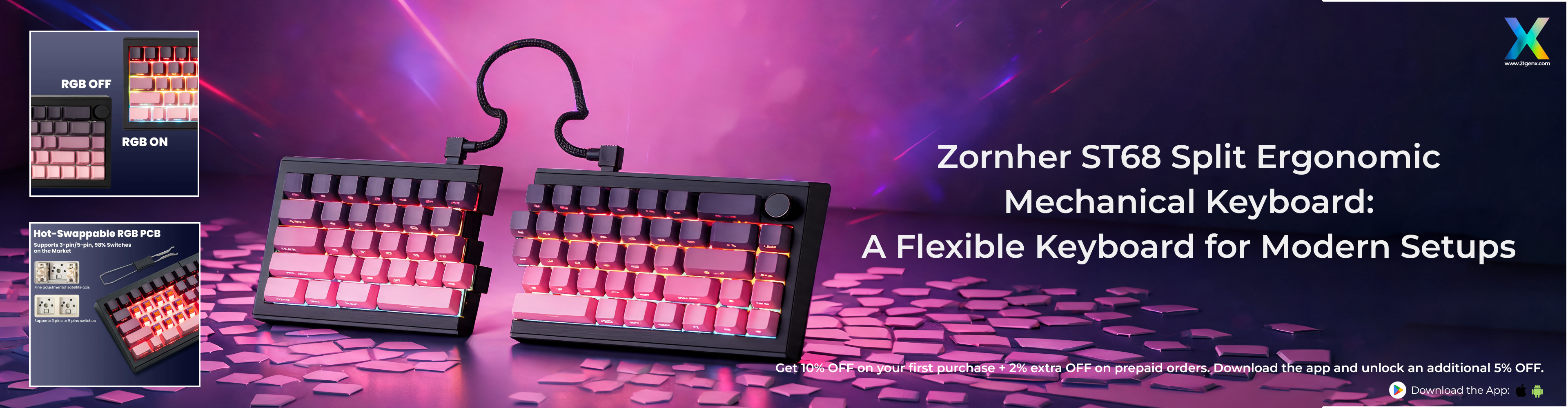
Zornher ST68 Split Ergonomic Mechanical Keyboard: A Flexible Keyboard for Modern Setups
Mechanical keyboards have evolved beyond traditional typing peripherals. Today, users look for keyboards that combine a satisfying mechanical typing experience with comfort, compact layouts, flexible connectivity, customisation, and distinctive design. The Zornher ST68 Split Ergonomic RGB Mechanical Keyboard – Blackberry brings these features together in a beautifully designed compact keyboard made for modern work, gaming, and creative setups.
Available through 21GenX, the Zornher ST68 is designed for users who want more flexibility from their keyboard. Its split configuration lets users position the two keyboard sections independently, giving them greater control over their typing setup. You can also connect the keyboard into a single configuration when you prefer a conventional compact setup.
The ST68 features a 68-key layout, multiple mechanical switch options, Bluetooth 5.0, 2.4GHz wireless and USB-C connectivity, a 3000mAh battery, dipped PBT keycaps, and 22 preset RGB lighting modes. These features make it suitable for professionals, content writers, programmers, gamers, designers, creators, and mechanical keyboard enthusiasts.
For users searching for an ergonomic mechanical keyboard, split ergonomic gaming keyboard, premium split mechanical keyboard, or ergonomic RGB gaming keyboard, the Zornher ST68 offers a distinctive combination of flexibility, functionality, and visual appeal.
The Rise of Ergonomic Mechanical Keyboards
Why Keyboard Comfort Matters
A keyboard is one of the most-used accessories in a computer setup. Professionals may spend hours writing, editing, coding, designing, communicating, or managing projects, while gamers can spend long sessions interacting with their keyboard.
This makes keyboard positioning on the desk increasingly important.
Traditional keyboards generally keep the entire layout in one fixed position. A split ergonomic keyboard takes a more flexible approach by separating the keyboard into two sections. The Zornher ST68 follows this concept, letting users adjust the position of the two keyboard halves to match their preferred typing setup.
Flexible Positioning for Different Users
Everyone has a different desk setup and typing preference. Some users may prefer the keyboard halves closer together, while others may want more space between them. The ST68 allows users to experiment with the positioning of the two sections. Users can also adjust the typing angle to match their preferred input posture. This makes the keyboard particularly relevant for people who spend extended periods typing and want greater control over their physical keyboard arrangement.
Ergonomics Without a Large Footprint
Ergonomic keyboards are often associated with larger designs, but the ST68 takes a different approach. It combines its split structure with a compact 68-key layout, giving users ergonomic flexibility while maintaining an efficient desk footprint.
This makes it suitable for modern workstations where desk space is valuable.
Why Choose the Zornher ST68 Split Ergonomic Mechanical Keyboard?
The Zornher ST68 brings several features together to create a keyboard designed around flexibility and personalisation.
Split Ergonomic Design
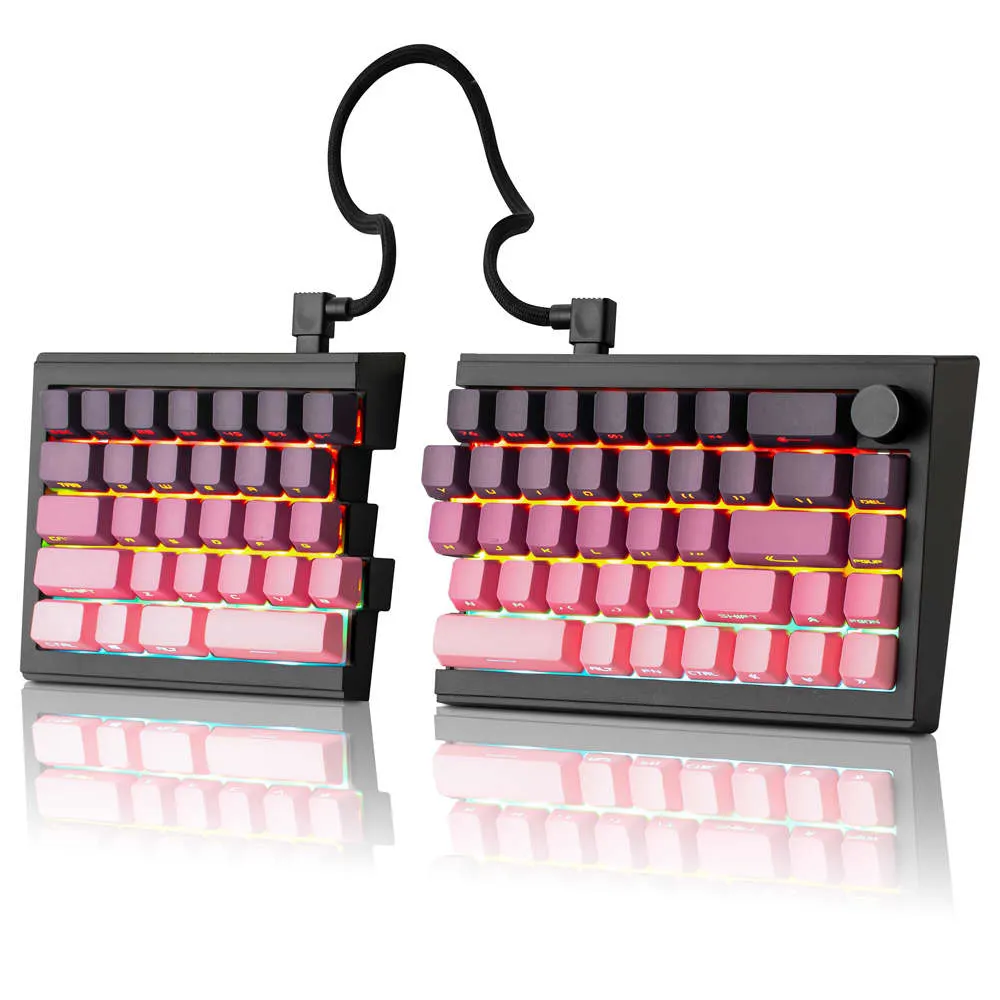
The ST68's defining feature is its split keyboard construction. The two sections can be separated, allowing users to adjust their position and typing angle. This gives users more freedom compared with a conventional keyboard where both sides remain permanently connected.
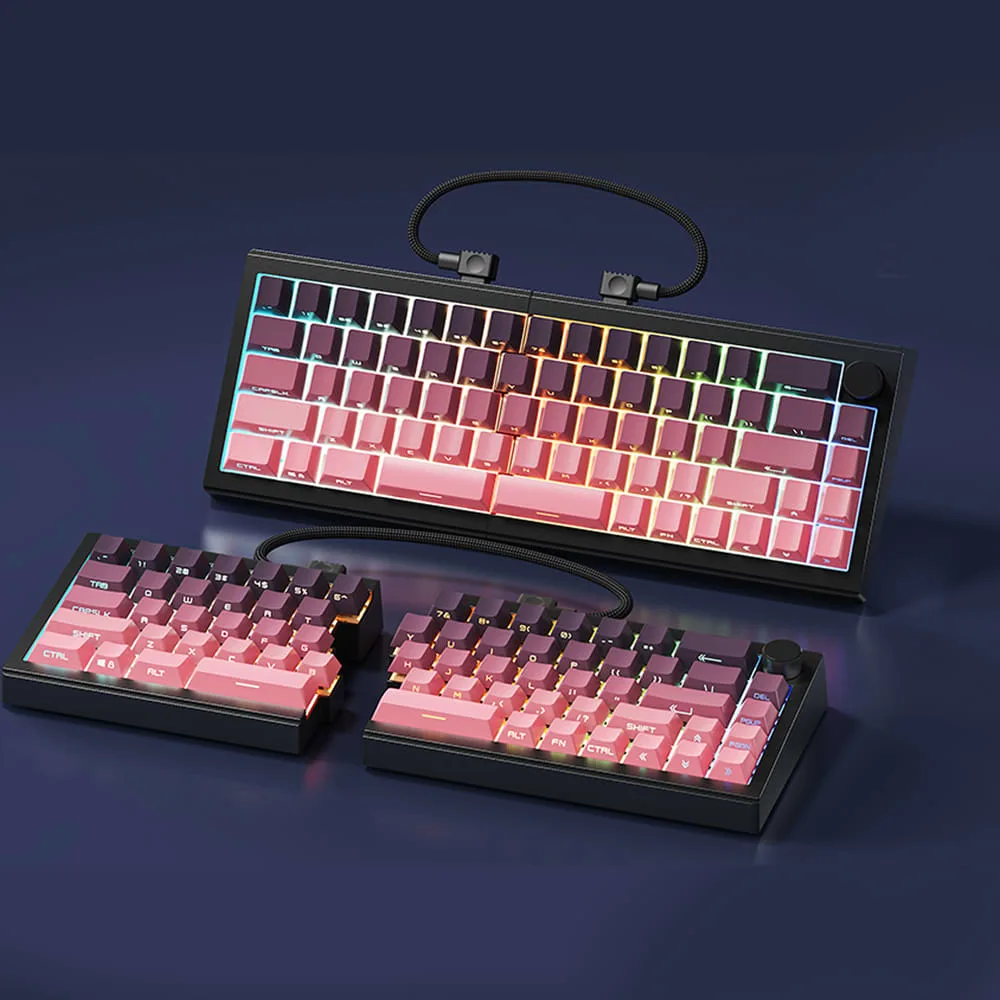
The two halves can also be connected with the included coiled cable, allowing the keyboard to be used as a single compact unit. This makes the ST68 adaptable to different desk layouts and working preferences.
Compact 68-Key Layout
The ST68 uses a 68-key compact layout. A smaller keyboard footprint can provide additional space for a mouse, desk mat, notebook, smartphone, speakers, or other accessories.
For gamers, the additional space can be particularly useful for mouse movement.
For professionals, the compact form factor can help create a cleaner and more organised workstation.
Multiple Mechanical Switch Options
The ST68 gives users a choice of mechanical switch configurations:
- Sakura Switch
- Meteor Switch
- Serene Switch
The Sakura Switch is described as creamy for a smooth sound, making it suitable for users who prefer a smoother mechanical typing experience. The Meteor Switch is described as fast for competitive gaming, making it relevant to users who prioritise speed and responsiveness. The Serene Switch provides another option for users looking for a different mechanical typing experience.
Triple-Mode Connectivity
The ST68 supports three different connection methods:
- Bluetooth 5.0
- 2.4GHz wireless
- USB-C wired connection
This lets users choose the connection method that best suits their workstation or gaming setup.
Explore the Zornher ST68 Split Ergonomic Mechanical Keyboard
Zornher ST68 Split Ergonomic RGB Mechanical Keyboard – Blackberry
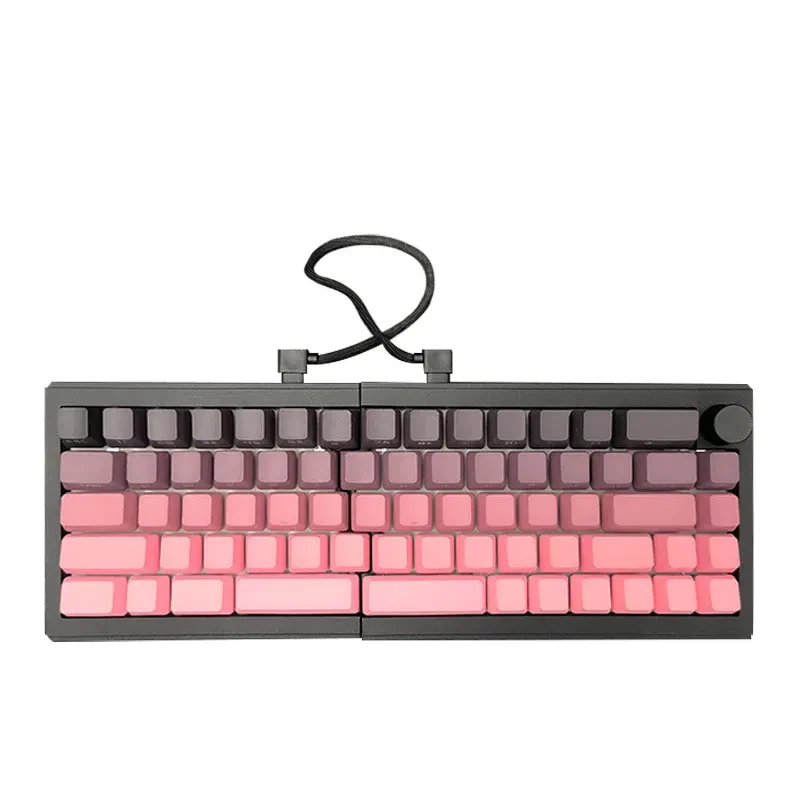
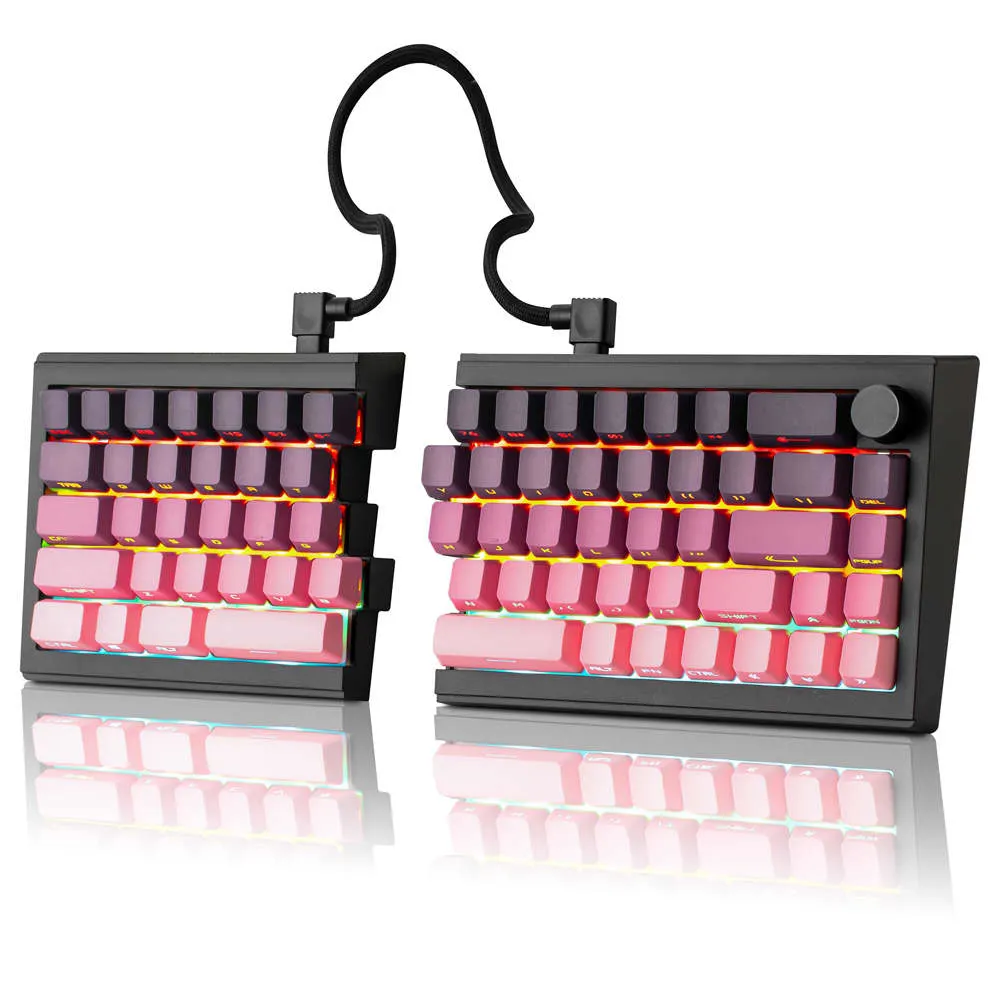
The Zornher ST68 Split Ergonomic RGB Mechanical Keyboard – Blackberry is designed for users who want more from a compact mechanical keyboard. Its split structure provides physical flexibility, while its compact layout helps preserve valuable desk space. The keyboard also combines mechanical switches with wireless connectivity and RGB lighting, making it suitable for both productivity-focused and entertainment-focused setups.
The Blackberry finish gives the keyboard a distinctive appearance that can stand out on a modern desk. Its dipped PBT keycaps, RGB lighting, and illuminated edges further contribute to its visual character. Most importantly, 21GenX offers this beautiful keyboard to Indian customers, giving them access to the Zornher ST68 for professional, gaming, and creative setups.
A Split Design for Flexible Typing
The split design is one feature that sets the ST68 apart from conventional compact mechanical keyboards. Instead of keeping both keyboard sections permanently attached, the ST68 lets users separate the two halves and position them to suit their preferences.
Adjustable Keyboard Positioning
Users can adjust the distance and angle between the two sections. This can be useful for people who want to experiment with different typing arrangements or create a more personalised workstation.
Split or Connected Configuration
The ST68 can be used in two ways. Users can separate the two halves when they want the flexibility of a split ergonomic keyboard. Alternatively, they can connect the two sections using the supplied coiled cable and use the keyboard as a unified compact keyboard. This gives users greater flexibility without requiring two separate keyboards.
Suitable for Long Typing Sessions
People who spend extended periods writing, programming, editing, or working on a computer may appreciate having more control over keyboard positioning. The ST68 provides this flexibility while maintaining a compact mechanical keyboard format.
68-Key Compact Layout for Modern Desks
A full-size keyboard can take up a lot of desk space. While a full-size layout can be useful for users who need a dedicated number pad and extensive key arrangement, many users prefer a more compact setup. The ST68's 68-key layout balances compactness with everyday functionality.
More Space for Mouse Movement
A compact keyboard leaves more room around the keyboard. For gamers, this can provide additional space for mouse movement.
More Room for Accessories
The additional desk space can also be used for:
- Mouse and mouse pad
- Smartphone
- Notebook
- Speakers
- Desk mat
- Other workstation accessories
Suitable for Compact Workstations
The smaller form factor works well for home offices, gaming desks, creative workstations, and other environments with limited desk space.
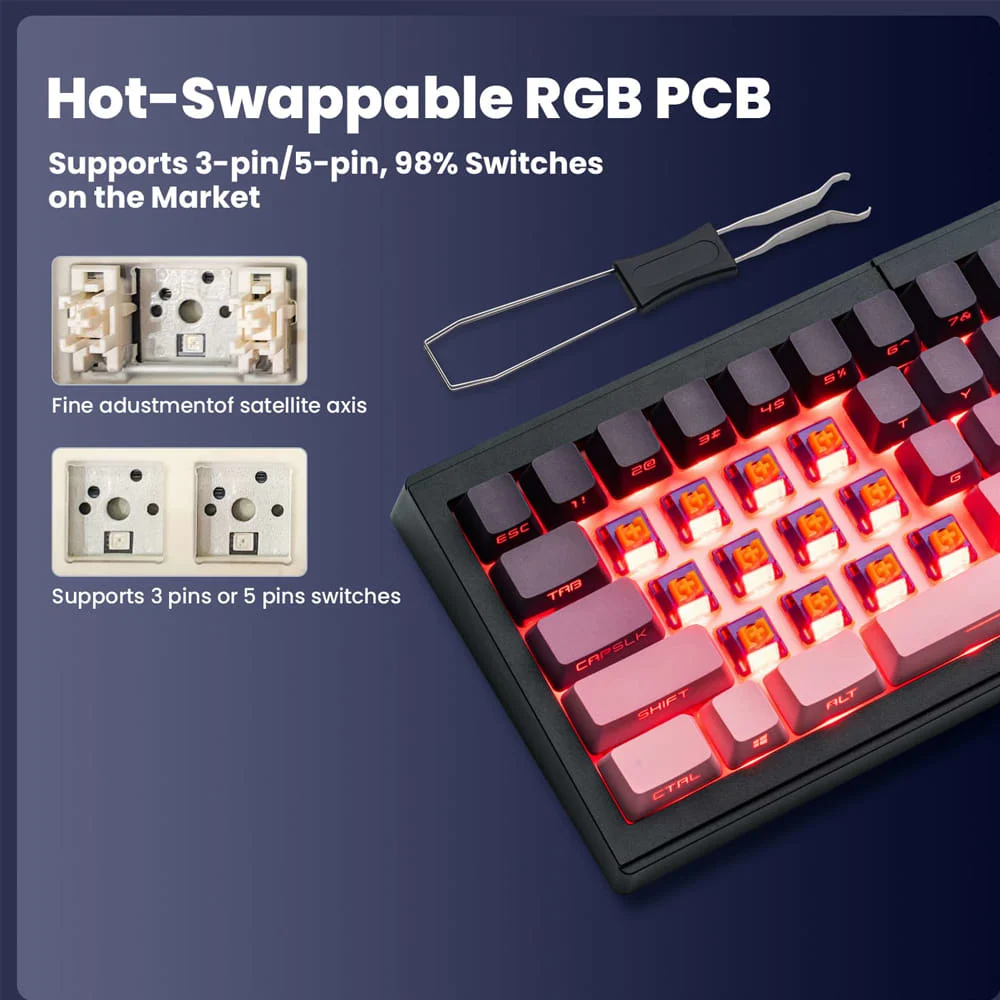
Tri-Mode Connectivity for Flexible Workflows
One of the Zornher ST68's major features is its ability to connect in three ways.
Bluetooth 5.0
Bluetooth 5.0 provides a wireless connection option for compatible devices. This can be useful for users who want to maintain a clean desk without keeping the keyboard connected through a cable. The ST68 can switch between up to five devices, making it useful for people who work across multiple compatible devices.
2.4GHz Wireless
The 2.4GHz wireless connection provides another cable-free option. This can be particularly useful for desktop and gaming environments where users want wireless freedom while maintaining a dedicated connection.
USB-C Wired Connection
The ST68 can also be used through USB-C.
Wired connectivity can be useful when:
- You prefer a direct connection
- You are working at a fixed desk
- You want to use the keyboard in wired mode
- You need to connect or power the keyboard through a cable
Having three connection methods gives the ST68 flexibility across different environments.
3000mAh Battery for Wireless Operation
The ST68 features a 3000mAh battery designed to support its wireless functionality. A built-in battery allows users to maintain a cable-free keyboard setup when using Bluetooth or 2.4GHz wireless connectivity.
The keyboard also includes a 1.8m nylon cable, providing a practical wired connection when required. This combination makes the ST68 suitable for users who want the option to switch between wireless and wired configurations depending on their needs.
Dipped PBT Keycaps with Clear Legends
Keycaps are an important part of any mechanical keyboard because they directly influence the feel and appearance in everyday use. The Zornher ST68 uses dipped PBT keycaps with clear legends. The PBT construction is designed for regular use while helping the keycaps maintain their appearance over time. The dipped design also contributes to the keyboard's distinctive aesthetic.
The clear legends work with the RGB lighting system to create a visually defined keyboard layout. The pink-gradient styling of the keycaps adds another visual element to the Blackberry configuration and complements the illuminated design.
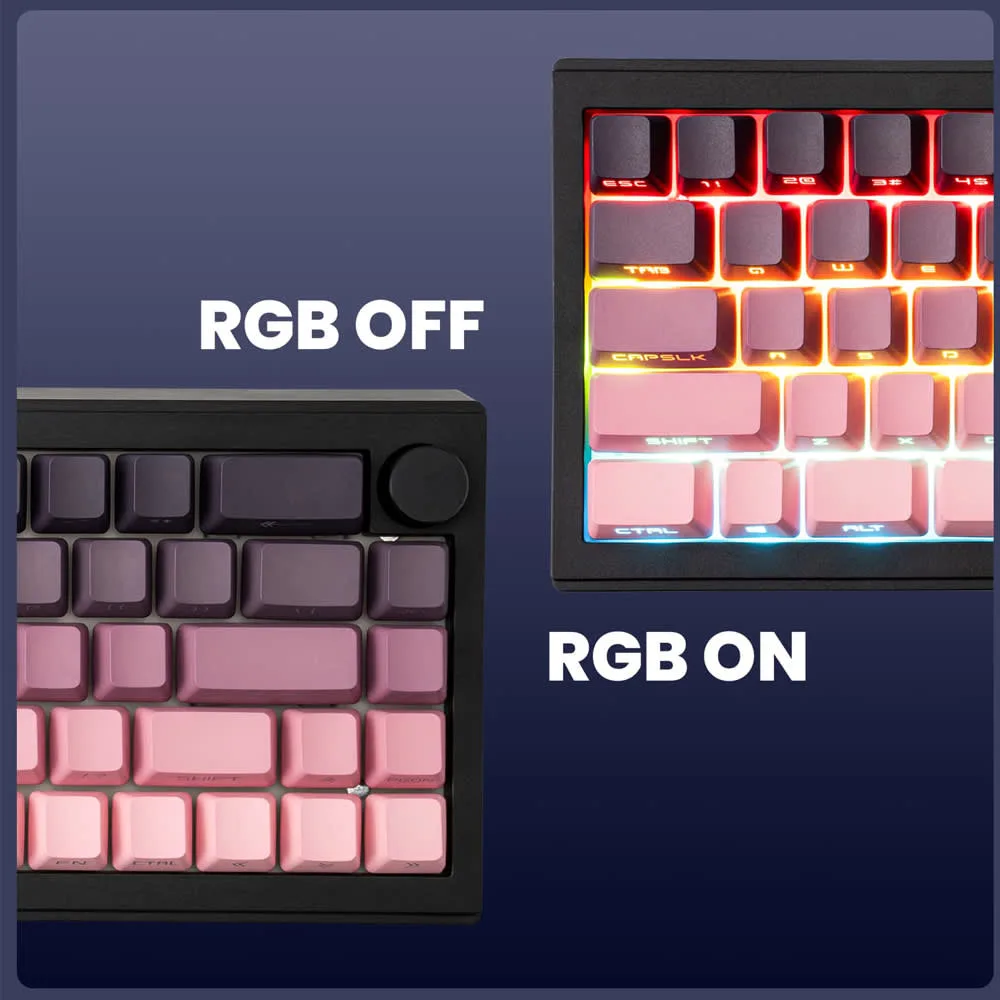
RGB Lighting with 22 Preset Modes
The ST68 is designed to fit the overall visual identity of a modern desk setup. Its RGB lighting system includes 22 preset modes, giving users multiple ways to customise the appearance of their keyboard.
South-Facing LEDs
The keyboard features south-facing LEDs as part of its lighting system.
Edge Glow
Edge lighting adds an additional illuminated element around the keyboard, helping create a more immersive appearance.
Gaming Setup Personalisation
RGB lighting can complement other components of a gaming setup, including a gaming mouse, monitor, PC, and other illuminated accessories.
Professional Setup Personalisation
RGB lighting is not limited to gaming. Users can choose more subtle lighting effects when using the keyboard in a professional workspace. This combination of RGB functionality and ergonomic design makes the ST68 an ergonomic RGB gaming keyboard that can work across different environments.
Mechanical Switch Options for Different Typing Styles
Mechanical switches directly affect how a keyboard feels and sounds. The Zornher ST68 offers three switch options, letting users choose a configuration that fits their preferred experience.
Sakura Switch
The Sakura Switch is described as creamy for a smooth sound. It suits users who prefer a smooth, refined mechanical typing experience.
Meteor Switch
The Meteor Switch is described as fast for competitive gaming. This makes it particularly relevant for gamers who prioritise responsiveness and fast input.
Serene Switch
The Serene Switch provides another option for users who want a different typing experience. Three switch options give the ST68 broader appeal across different types of mechanical keyboard users.
Designed for Work, Gaming and Creative Workflows
The ST68 isn't designed for just one user category. Its combination of compact design, ergonomic positioning, mechanical switches, RGB lighting, and multiple connectivity options makes it suitable for different workflows.
For Content Writers
Content writers spend a significant amount of time typing. The ST68 gives writers a compact mechanical keyboard with flexible positioning options. The split configuration lets users adjust the keyboard halves to their preferred desk setup.
For Programmers
Programmers often work with a keyboard for several hours each day. The compact 68-key layout leaves more room on the desk for a mouse and other accessories, while the split configuration allows users to experiment with different keyboard positions.
For Gamers
Gamers can benefit from the compact layout and additional mouse space. The ST68 also includes RGB lighting and multiple connectivity options. Users looking for a split ergonomic gaming keyboard can take advantage of the adjustable positioning of the two keyboard sections.
For Designers and Creators
Designers and creators often work with multiple devices and accessories. The compact ST68 can help preserve workspace while its split configuration provides flexibility around other equipment.
For Professionals and Remote Workers
A home office may not have a large desk. The compact design of the ST68 can help users make better use of limited space while still having access to mechanical switches, wireless connectivity, and ergonomic positioning.
For Mechanical Keyboard Enthusiasts
Mechanical keyboard enthusiasts can explore different switch options and experiment with the physical positioning of the keyboard. The ST68 combines mechanical switch choices, RGB lighting, split construction, and multiple connectivity options into one platform.
Key Features of the Zornher ST68
The major features of the Zornher ST68 include:
- 68-key compact layout
- Split ergonomic design
- Adjustable typing angle
- Split or connected configuration
- Sakura Switch option
- Meteor Switch option
- Serene Switch option
- Bluetooth 5.0
- 2.4GHz wireless connectivity
- USB-C wired connectivity
- Support for up to five devices
- 3000mAh battery
- Dipped PBT keycaps
- Clear legends
- RGB lighting
- 22 preset RGB modes
- South-facing LEDs
- Edge glow
- 1.8m nylon cable
- Blackberry colour
Zornher ST68 Split Ergonomic Mechanical Keyboard Specifications
Feature --------- Details
Product Name ------------- Zornher ST68 Split Ergonomic RGB Mechanical Keyboard
Colour --------- Blackberry
Keyboard Type ---------- Split Ergonomic Mechanical Keyboard
Layout ---------- 68-Key Compact Layout
Switch Options --------- Sakura, Meteor, Serene
Connectivity ------------- Bluetooth 5.0, 2.4GHz Wireless, USB-C
Device Support ----------- Up to 5 Devices
Battery --------- 3000mAh
Keycaps ------- Dipped PBT
Legends ---------- Clear Legends
RGB Lighting ---------- Yes
RGB Modes ----------- 22 Preset Modes
LED Position ------- South-Facing
Additional Lighting -------------- Edge Glow
Cable ------- 1.8m Nylon Cable
Configuration -------------- Split or Connected
Benefits of Using the Zornher ST68
Flexible Positioning
The split design allows users to position the two keyboard sections according to their preferred arrangement.
Compact Desk Footprint
The 68-key layout takes up less desk space than a traditional full-size keyboard.
Multiple Connection Options
Bluetooth 5.0, 2.4GHz wireless, and USB-C provide flexibility for different devices and workflows.
Multiple Switch Choices
Sakura, Meteor, and Serene switches give users options depending on their preferred typing or gaming experience.
Wireless Convenience
The 3000mAh battery supports wireless use without requiring the keyboard to remain connected by cable.
Personalised RGB Lighting
Twenty-two RGB modes allow users to customise the appearance of their keyboard.
Distinctive Keycap Design
Dipped PBT keycaps with clear legends add both functionality and visual character.
Split and Connected Use
Users can switch between a split configuration and a connected keyboard depending on their preference.
Ergonomic Mechanical Keyboard for Different Work Environments
Home Office
The ST68 can help maximise limited desk space while offering flexible keyboard positioning and wireless connectivity.
Gaming Setup
Its compact footprint leaves more room for mouse movement, while RGB lighting enhances the gaming environment.
Creative Workspace
Creators can position the keyboard halves around other equipment and maintain more flexibility in their desk setup.
Professional Workstation
The ST68 can complement modern professional workstations where compact design and flexible connectivity are important.
How to Choose the Right Ergonomic Mechanical Keyboard
Consider the Layout
Think about the keys you use regularly. If you do not need a dedicated number pad, a compact layout can free up valuable desk space.
Look at the Keyboard Configuration
For more control over your typing position, consider a split keyboard instead of a conventional fixed layout.
Check Connectivity Options
Consider whether your setup requires Bluetooth, 2.4GHz wireless, USB-C, or all three.
Select the Right Switch
Your switch choice influences the feel and sound of a mechanical keyboard. The ST68 offers Sakura, Meteor, and Serene options.
Consider Battery Capacity
If wireless connectivity matters, the keyboard's battery capacity is a key specification to consider.
Look at RGB Features
For gaming and personalised workstations, RGB lighting can become part of the overall desk setup.
Consider Desk Space
A compact keyboard can provide additional room for a mouse and other accessories.
Think About Your Typing Position
If you spend long periods typing, a split design can give you more control over keyboard positioning.
How to Maintain Your Zornher ST68 Mechanical Keyboard
Clean the Keycaps Regularly
Dust and debris can collect between the keys over time. Regular cleaning can help maintain the keyboard's appearance.
Clean Between the Keys
Use a suitable cleaning tool to remove dust and debris from areas around the keycaps.
Keep Liquids Away
Avoid exposing the keyboard to unnecessary moisture or liquid spills.
Handle the Cable Carefully
When using the 1.8m nylon cable, avoid excessive bending or pulling.
Store the Keyboard Properly
If you are not using the keyboard for an extended period, store it in a clean and dry environment.
Keep the Setup Organised
The split configuration gives you flexibility, but keeping both sections properly positioned can help maintain a clean and efficient workstation.
Why Buy the Zornher ST68 from 21GenX?
The Zornher ST68 Split Ergonomic RGB Mechanical Keyboard – Blackberry is available through 21GenX, giving Indian customers access to this beautifully designed mechanical keyboard. 21GenX brings distinctive products and global brands to Indian consumers across technology, lifestyle, office, home, and other categories.
For keyboard enthusiasts, gamers, professionals, writers, programmers, and creators, the Zornher ST68 is an option that combines ergonomic flexibility with mechanical performance and modern connectivity.
Customers shopping through 21GenX can also benefit from:
- Free Shipping Across India
- Extra 2% Off on Prepaid Orders
- Easy Exchange & Hassle-Free Returns
- Authentic Products Guaranteed
- 100% Secure Payments & Trusted Checkout
The Zornher ST68 is therefore a strong option for anyone searching for a premium split mechanical keyboard that combines flexible positioning, mechanical switches, RGB lighting, wireless connectivity, and a distinctive design.
What Is 21GenX?
21GenX is an online platform bringing global brands and distinctive products to Indian consumers. Its product selection spans technology, office products, lifestyle, home and kitchen, baby and kids, pet products, and other categories.
For technology enthusiasts, 21GenX provides access to products that can help users build more functional, personalised, and design-focused workstations and gaming setups. The Zornher ST68 Split Ergonomic RGB Mechanical Keyboard – Blackberry is one such product, combining ergonomic functionality with distinctive aesthetics for users looking to upgrade their keyboard setup.
FAQ
Q. What is the Zornher ST68 Split Ergonomic Mechanical Keyboard?
A. The Zornher ST68 is a compact split mechanical keyboard with a 68-key layout, multiple switch options, RGB lighting, tri-mode connectivity, and a 3000mAh battery.
Q. Is the Zornher ST68 an ergonomic mechanical keyboard?
A. Yes. Its split design lets users separate the two keyboard sections and adjust their positions to match their preferred typing style.
Q. Is the Zornher ST68 suitable for gaming?
A. Yes. The ST68 is suitable for gaming and features mechanical switches, RGB lighting, a compact layout, and 2.4GHz wireless connectivity. The Meteor Switch option is described as fast for competitive gaming.
Q. Is the Zornher ST68 a split ergonomic gaming keyboard?
A. Yes. The keyboard features a split design that lets you separate the two sections and position them independently, making it suitable for gaming setups where flexible positioning is preferred.
Q. What switch options are available for the Zornher ST68?
A. The ST68 is available with Sakura, Meteor, and Serene switch options.
Q. What is the Sakura Switch like?
A. The Sakura Switch is described as creamy for a smooth sound, making it suitable for users who prefer a smooth mechanical typing experience.
Q. What is the Meteor Switch designed for?
A. The Meteor Switch is described as fast for competitive gaming, making it relevant for users who prioritise gaming responsiveness.
Q. Does the Zornher ST68 have RGB lighting?
A. Yes. The keyboard features RGB lighting with 22 preset modes, south-facing LEDs, and edge glow.
Q. What connectivity options does the Zornher ST68 support?
A. It supports Bluetooth 5.0, 2.4GHz wireless, and USB-C wired connectivity.
Q. Can the ST68 connect to multiple devices?
A. Yes. The keyboard supports switching between up to five devices.
Q. What is the battery capacity of the Zornher ST68?
A. The keyboard features a 3000mAh battery for its wireless functionality.
Q. Can the Zornher ST68 be used as a regular connected keyboard?
A. Yes. The two halves connect with the included coiled cable, letting you use it as a unified compact keyboard.
Q. What type of keycaps does the Zornher ST68 use?
A. The ST68 uses dipped PBT keycaps with clear legends.
Q. How many RGB modes does the ST68 have?
A. It has 22 preset RGB lighting modes.
Q. Is the Zornher ST68 suitable for content writers?
A. Yes. Its compact design and flexible split configuration can suit content writers and other professionals who spend extended periods typing.
Q. Is the Zornher ST68 suitable for programmers?
A. Yes. The compact layout saves desk space, while the split design gives programmers more flexibility in keyboard positioning.
Q. Is the Zornher ST68 a premium split mechanical keyboard?
A. The ST68 is designed as a premium split mechanical keyboard, combining a split configuration with multiple mechanical switch options, RGB lighting, PBT keycaps, and tri-mode connectivity.
Q. Is the Zornher ST68 an ergonomic RGB gaming keyboard?
A. Yes. It combines an ergonomic split configuration with RGB lighting, mechanical switches, and wireless connectivity, making it suitable for gaming and personalised desktop setups.
Q. Where can I buy the Zornher ST68 in India?
A. The Zornher ST68 Split Ergonomic RGB Mechanical Keyboard – Blackberry is available through 21GenX for Indian customers.
Final Thoughts
The Zornher ST68 Split Ergonomic RGB Mechanical Keyboard – Blackberry brings a different approach to the modern mechanical keyboard. Its 68-key compact layout helps save desk space, while the split configuration allows users to separate and reposition the two keyboard sections according to their preferred typing arrangement. The ability to switch between a split and connected configuration gives the keyboard additional versatility.
The ST68 also offers Sakura, Meteor, and Serene switch options, giving users different mechanical experiences depending on their requirements. Bluetooth 5.0, 2.4GHz wireless, and USB-C connectivity provide flexibility across different devices and workflows, while the 3000mAh battery supports wireless operation.
The dipped PBT keycaps, clear legends, Blackberry finish, and 22 RGB lighting modes further enhance the keyboard's visual and functional appeal. For users searching for an ergonomic mechanical keyboard, split ergonomic gaming keyboard, premium split mechanical keyboard, or ergonomic RGB gaming keyboard, the ST68 offers a well-rounded combination of flexible positioning, mechanical performance, modern connectivity, and distinctive design.
Most importantly, this beautiful Zornher ST68 keyboard is available through 21GenX, making it an accessible choice for Indian users looking to bring a more personalised and flexible mechanical keyboard experience to their workstation, gaming desk, or creative setup.