21genX: Curated Chronicles
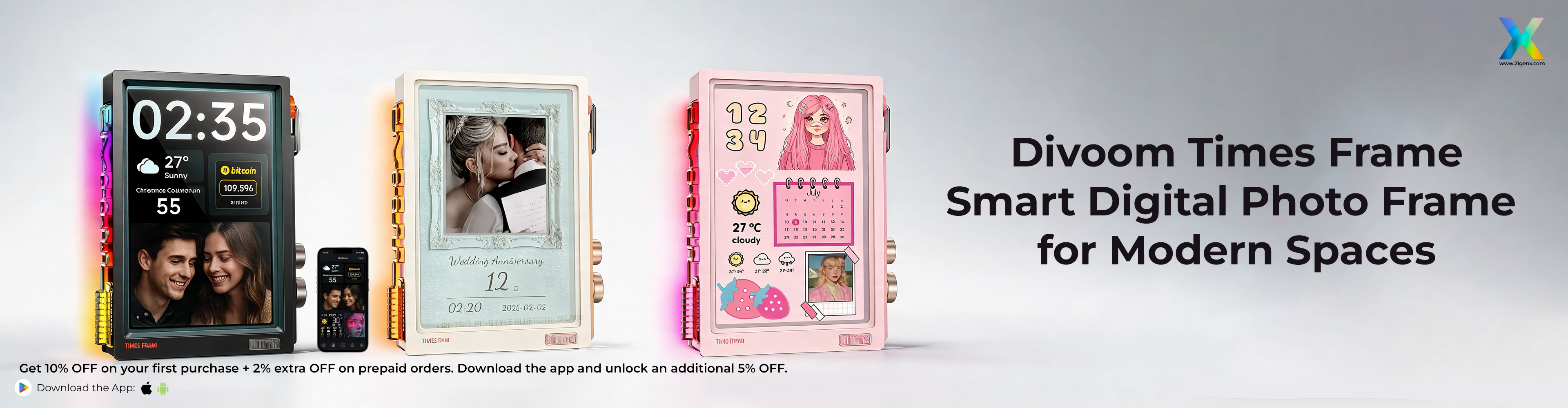
Divoom Times Frame Smart Digital Photo Frame for Modern Spaces
A digital photo frame can do more than display memories. With the right design and features, it can also become a creative display, a productivity companion, and a distinctive part of your home or office décor. The Divoom Times Frame brings these functions together through a transparent display, customisable pixel art, digital clocks, live information, and multimedia playback.
Designed for desks, bedrooms, offices, and creative spaces, the Divoom Times Frame smart desk display combines personal photos and videos with useful widgets and digital artwork. Its transparent screen creates a distinctive floating visual effect, helping displayed content stand out while complementing a modern setup.
With Wi-Fi connectivity, built-in storage, and control through the Divoom mobile app, the Divoom Times Frame digital picture frame offers an interactive alternative to a traditional photo frame. It is designed for people who want to personalise their surroundings while keeping useful information and digital memories visible.
Divoom Times Frame Overview
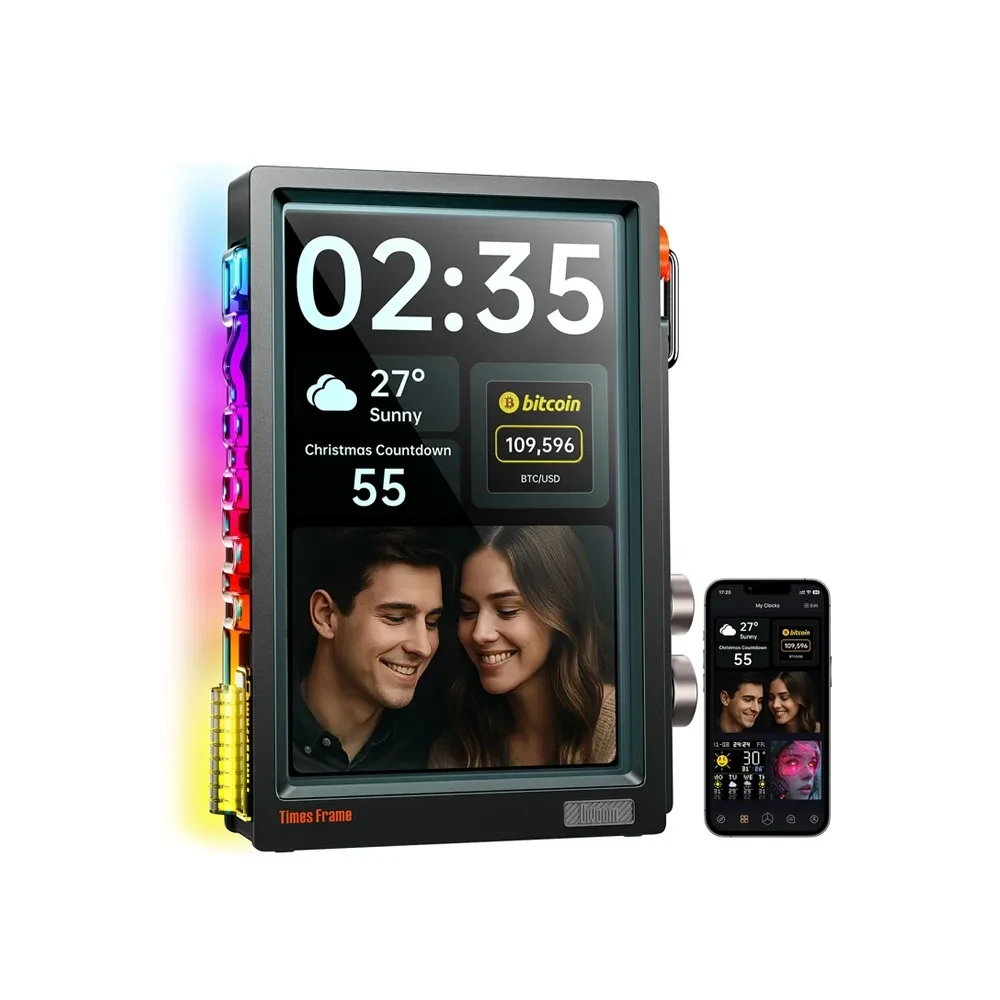
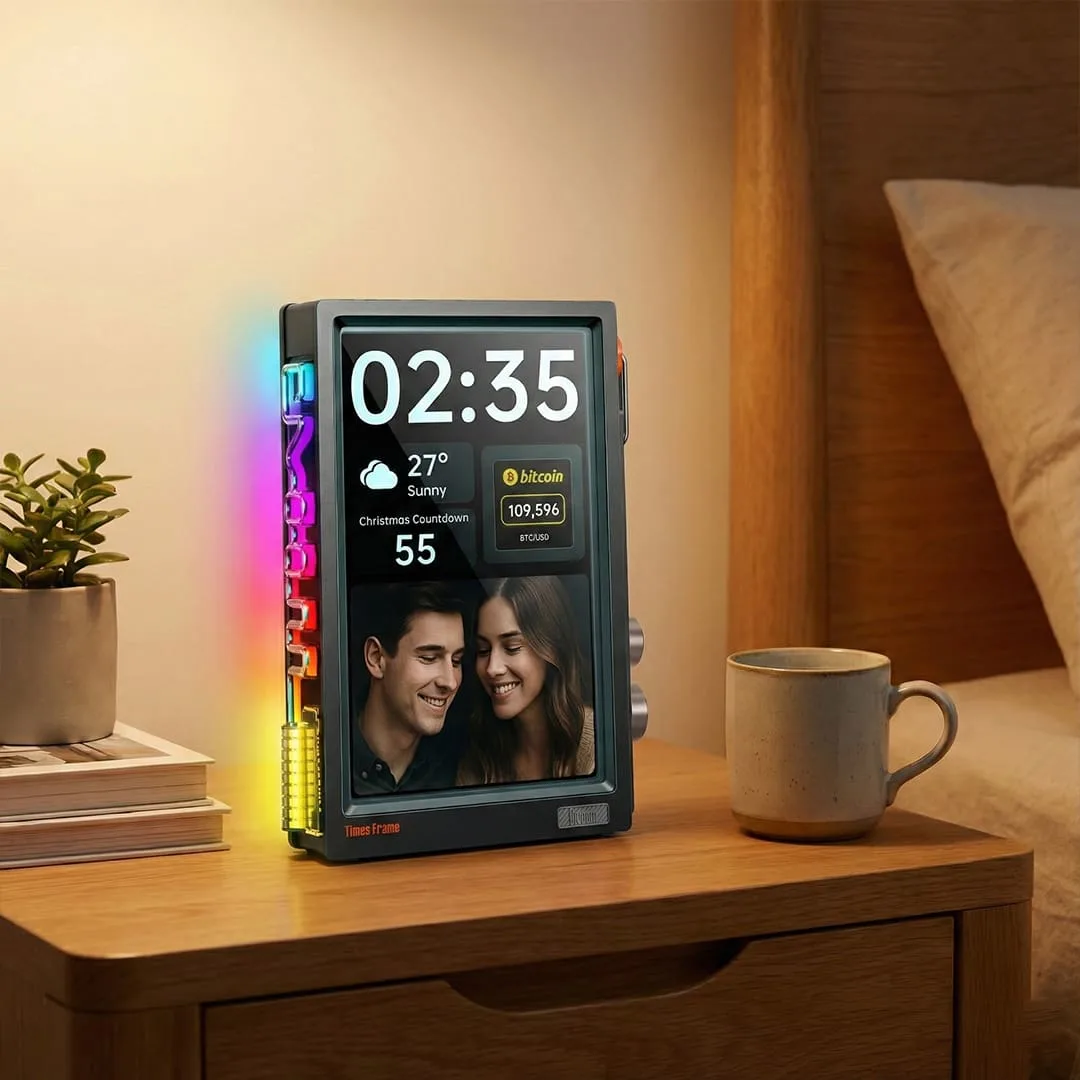
The Divoom Times Frame is a smart digital display that combines photo and video playback with pixel art, clocks, calendars, weather information, and productivity tools. Instead of being limited to a slideshow of pictures, it can be customised to suit different environments and everyday needs.
Its 10.1-inch transparent IPS display is central to its design. The semi-transparent screen creates depth around photos, animations, and other visual content, giving the frame a distinctive look on a desk or shelf.
The device connects through Wi-Fi and works with the Divoom app on compatible iOS and Android devices. Users can manage displayed content, explore pixel artwork, and personalise the screen to match their preferences.
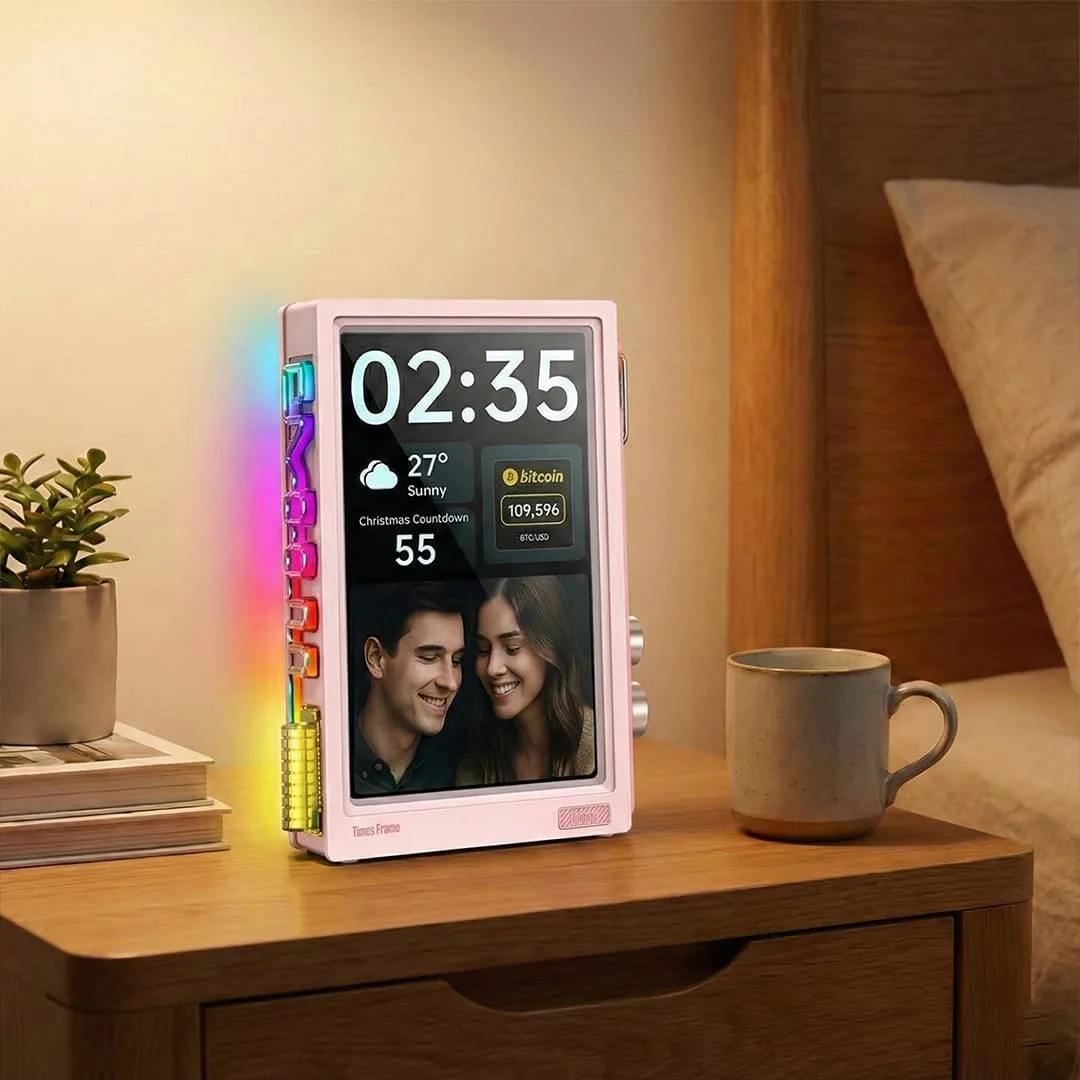
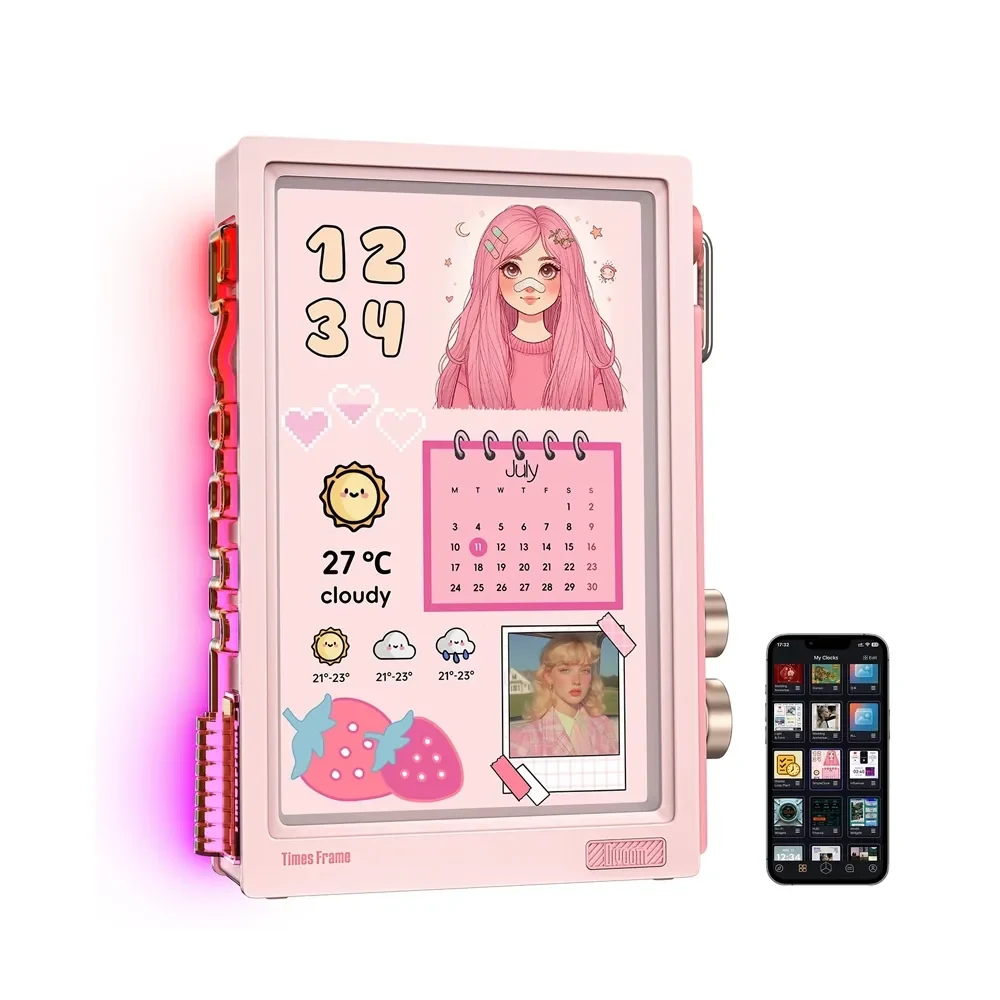
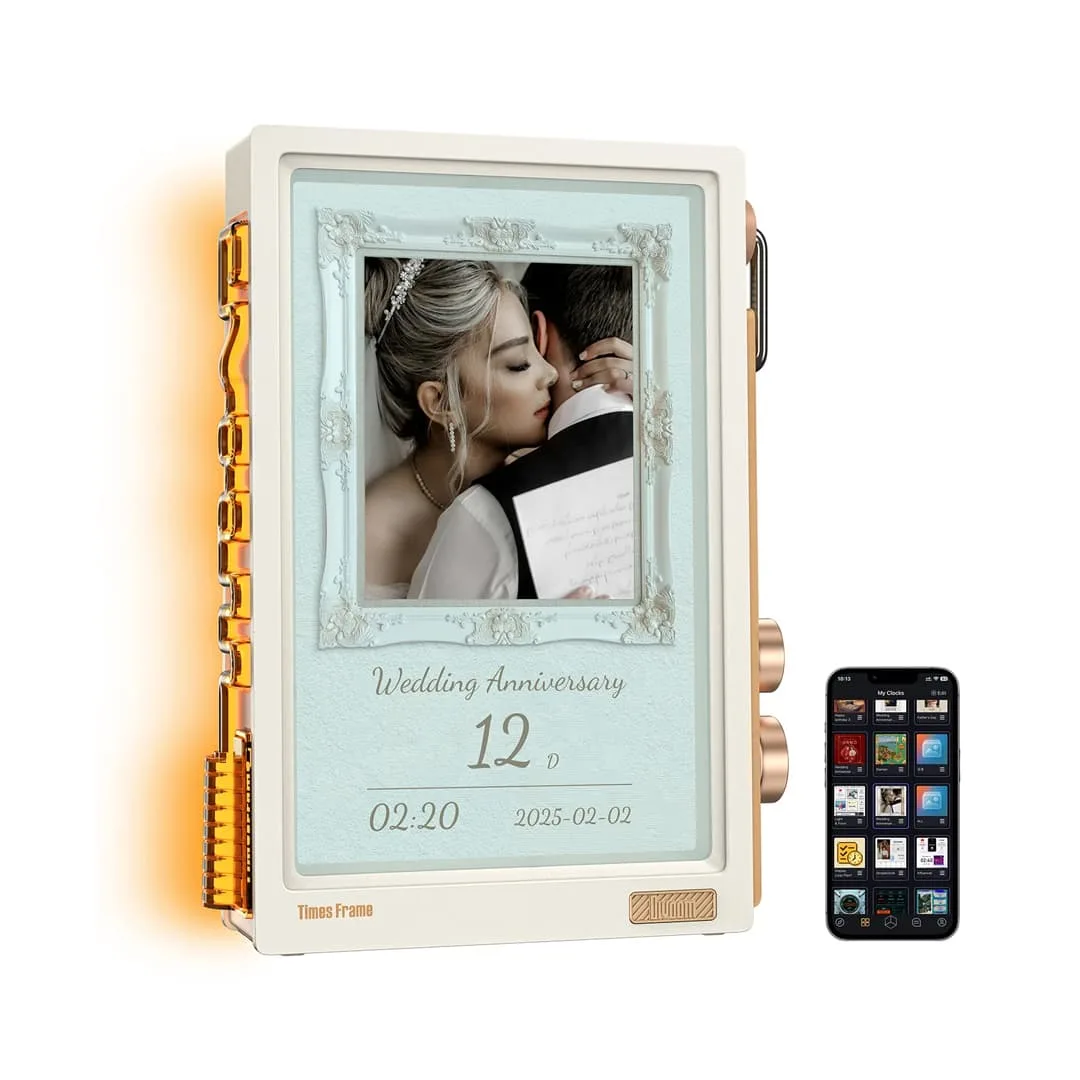
The Divoom Times Frame is available in three colour options listed on 21GenX: Beige, Black, and Pink. This allows users to consider the frame's appearance alongside their existing desk accessories or interior décor.
Key Specifications of the Divoom Times Frame
Feature ---------- Details
Product Name ------------------ Divoom Times Frame Smart Digital Photo Frame
Display Size ------------- 10.1 inches
Display Type ----------------- Transparent IPS display
Internal Storage ---------------- 64GB
Connectivity ------------------ Wi-Fi
App Compatibility --------------- iOS and Android
Photo and Video Playback ----------- Supported
Pixel Art ------------- Customisable artwork and animations
Clock Faces ------------- 400+ designs
Smart Widgets -------------- Weather, calendar, countdowns, and finance information
Productivity Tools -------------- Pomodoro timer, reminders, and calendar functions
Colour Options ------------------ Beige, Black, Pink
Primary Uses ------------ Digital photo frame, smart desk display, digital art, and décor
The specifications above are based on the product information supplied and Divoom's official product listing.
Features That Make the Divoom Times Frame Stand Out
1. Transparent 10.1-Inch IPS Display
The transparent display is one of the Divoom Times Frame's most distinctive features. Unlike conventional digital frames with opaque screens, its semi-transparent IPS panel creates a floating visual effect around the displayed content.
Photos, animations, and widgets become part of the surrounding space rather than appearing like a standard screen placed on a desk. This gives the frame a contemporary appearance that suits modern interiors and creative workspaces.
The 10.1-inch display offers space for personal photos, digital artwork, clocks, and other visuals. It can be used as a decorative centrepiece or as a practical display that remains visible throughout the day.
2. Digital Photos and Video Playback
The Divoom Times Frame lets you display personal memories without relying on printed photographs or a traditional frame. Users can upload photos and videos through the Divoom app and customise the content shown on the display. Family photographs, travel memories, celebrations, and everyday moments can all become part of a rotating digital display.
Video playback adds another dimension, letting users share moving memories alongside still images. This makes the frame suitable for bedrooms, living spaces, offices, and personal workstations. For people who prefer keeping favourite moments visible rather than stored on a phone, the Divoom Times Frame offers a dedicated display for those memories.
3. 64GB Built-In Storage
The Divoom Times Frame includes 64GB of internal storage, letting users keep a substantial collection of photos, videos, and digital content on the device.
According to Divoom, this storage can hold hundreds of thousands of images, depending on file size, along with extended video content. Built-in storage provides a convenient way to maintain a personal collection without depending entirely on an external memory card.
It also means the frame can serve as a dedicated home for selected digital memories. Users can organise the content they want to display and refresh it as their preferences change.
4. Wi-Fi Connectivity and Divoom App Control
The Divoom Times Frame smart desk display connects through Wi-Fi and is controlled using the Divoom mobile app on compatible iOS and Android devices. This allows users to manage their display content and explore its customisation options from a smartphone. Photos, videos, pixel art, clock faces, and other supported content can be selected to suit the intended use.
App-based control is particularly convenient when the frame is positioned on a desk or shelf and users want to update its appearance without repeatedly handling the device. Wi-Fi connectivity also supports smart display functions that bring relevant information and personalised content together in one place.
5. More Than 400 Digital Clock Faces
A digital clock can be a practical part of a workspace, but the Divoom Times Frame adds visual variety through its extensive selection of clock faces. With more than 400 clock face designs listed by the manufacturer, users can choose a display that suits their preferred aesthetic. Options can help the frame feel more playful, minimal, decorative, or information-focused.
Users can use the clock display on a desk, bedside table, or shelf where checking the time at a glance is convenient. Instead of keeping the same look all day, users can explore different clock styles to make their setup feel more personal.
6. Live Weather and Calendar Widgets
The Divoom Times Frame can display useful information through widgets, including weather and calendar features. A weather widget lets users check conditions at a glance before heading out, while a calendar display supports everyday planning. Countdown functions can also highlight upcoming occasions, personal milestones, or events.
These features make the Divoom Times Frame digital picture frame useful for more than just displaying photographs. It can become a small information hub that combines personal content with practical details. For a home office or study desk, this means the display can support everyday organisation while remaining part of the room's décor.
7. Finance Information and Stock Tickers
The Times Frame also supports finance-related information, including stock tickers and other supported live data displays. For users who like to keep an eye on selected financial information while working, this offers another way to personalise the screen. Instead of switching between applications, they can use a compatible display option to keep the chosen information visible.
The availability and accuracy of live data may depend on the selected widget, app configuration, and network connection. Users should continue to rely on appropriate financial services for decisions that require verified, current information.
8. Custom Pixel Art and Animations
Pixel art is an important part of Divoom's product identity, and the Times Frame brings this visual style to a larger smart display. Users can explore digital artwork and animations through the Divoom ecosystem or personalise the display with their own supported content. This gives the frame a creative purpose beyond photos and information widgets.
Pixel art can add colour to a gaming desk, create a playful atmosphere in a bedroom, or introduce a distinctive visual element to a creative studio. The display can be adapted to reflect different interests and moods, making it suitable for people who enjoy personalising their digital environment.
9. Pomodoro Timer and Productivity Tools
The Divoom Times Frame smart desk display includes productivity-oriented functions such as a Pomodoro timer, reminders, and calendar tools. The Pomodoro technique involves working in focused intervals separated by breaks. A timer can help users follow this structure while studying, writing, planning, or completing office tasks.
Reminders can support daily routines, while calendar functions help bring scheduling information into the workspace. These tools are especially relevant for remote workers, students, and people who spend long periods at a desk. By combining productivity functions with photos and artwork, the Times Frame can contribute to a workspace that feels both organised and personal.
10. Three Colour Options for Different Spaces
The Divoom Times Frame is listed on 21GenX in three colour options: Beige, Black, and Pink.
- Beige: A soft, understated option for neutral interiors, light desks, and warm-toned décor.
- Black: A versatile choice for modern workstations, darker desk setups, and minimalist spaces.
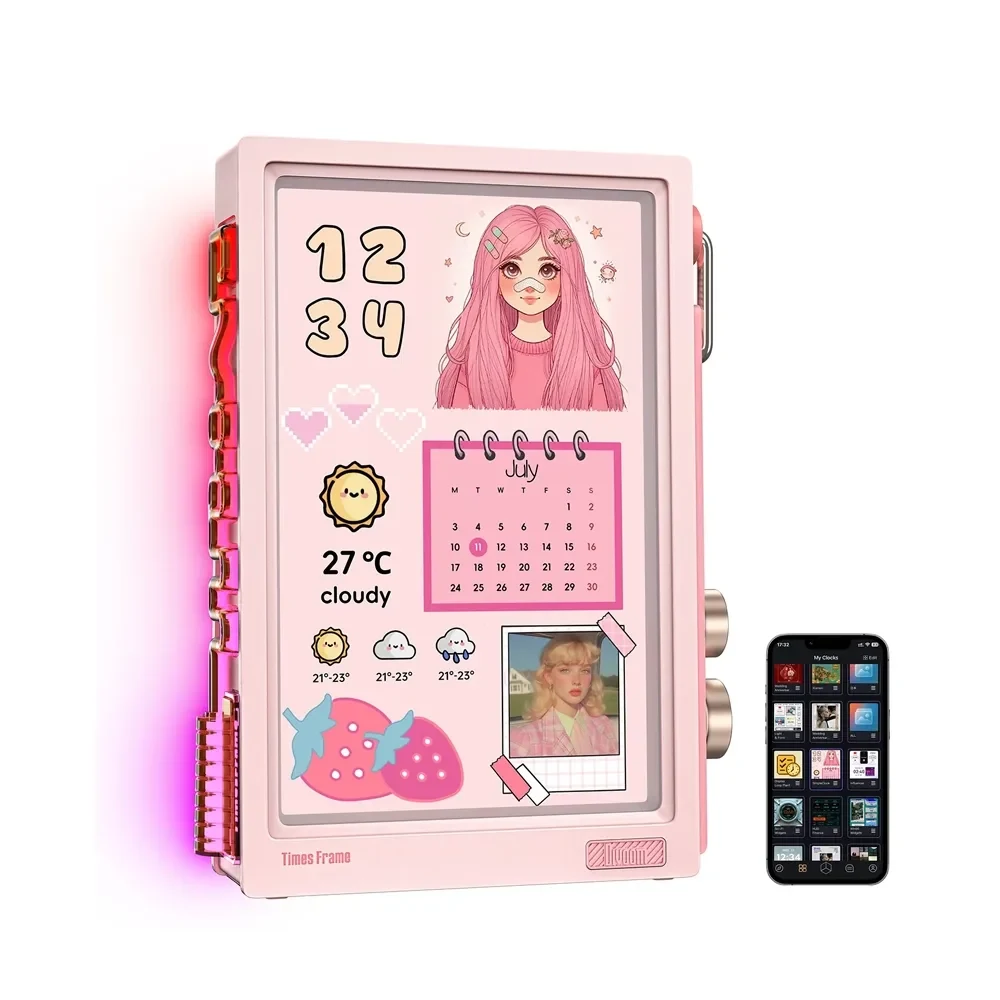
- Pink: An expressive option for colourful rooms, creative desks, and personalised setups.
The colour choice can help the frame complement the surrounding furniture and accessories. While the display provides the main visual experience, the frame's exterior also shapes how it looks in a room.
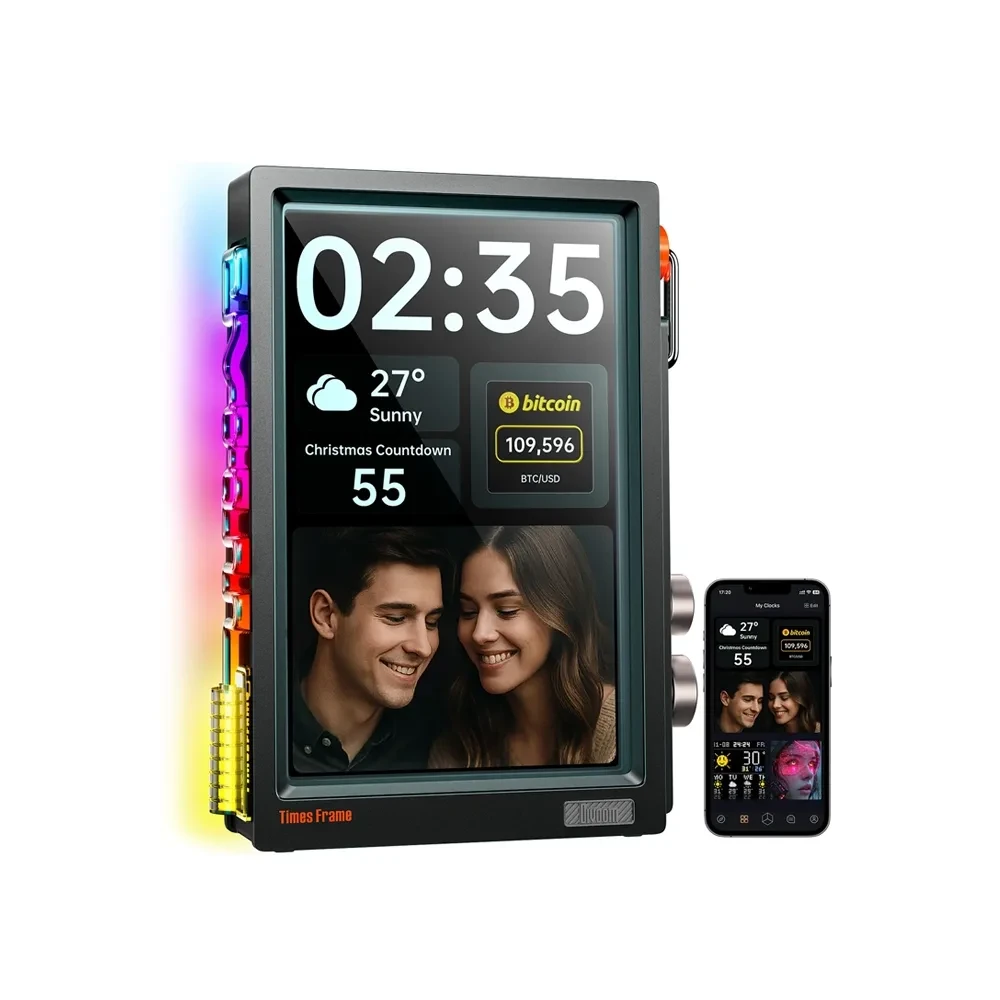
Divoom Times Frame Colour Options
Divoom Times Frame Beige
The Beige option works well with neutral interiors, wooden furniture, and lighter desk accessories. It suits people who prefer a softer look for their workspace or bedside table.
Divoom Times Frame Black
The Black option suits contemporary workspaces, gaming setups, and minimalist décor. Its understated exterior can pair easily with monitors, keyboards, and other dark desk accessories.
Divoom Times Frame Pink
The Pink option adds a more expressive touch to creative workspaces, bedrooms, and colourful desk setups. It can complement other personalised accessories and decorative items. Colour availability may vary, so check the product listing for the options currently offered.
Who Should Consider the Divoom Times Frame?
The Divoom Times Frame is designed for people who want a display that combines personal content, digital artwork, and useful information. Its features can appeal to different types of users.
1. Professionals and Remote Workers
Professionals can use the Times Frame to display the time, calendar information, reminders, and other supported widgets while working. Its customisable appearance also adds personality to a home office or professional desk.
2. Students
Students can use the digital display for clocks, countdowns, reminders, and focus timers. It can also display photographs and pixel art, helping create a more personalised study environment.
3. Photography Enthusiasts
People with large collections of digital photographs may appreciate having a dedicated display for their favourite images. The frame can rotate through memories from holidays, family gatherings, celebrations, and other occasions.
4. Digital Art and Pixel Art Fans
The customisable display makes the Times Frame relevant to people who enjoy digital art, animated graphics, and pixel-style visuals. It brings that interest into a physical workspace.
5. Gaming and Desk Setup Enthusiasts
The transparent screen and digital widgets can complement a gaming setup or a carefully organised desk. The ability to switch between clocks, artwork, and other content allows users to customise the visual theme of their space.
6. Home Décor Enthusiasts
For people who enjoy modern home accessories, the Times Frame combines a decorative frame with digital functionality. It can sit on a desk, shelf, or bedside table and display content that changes with personal preferences.
7. Families and Long-Distance Loved Ones
A digital photo frame can keep meaningful photographs visible in shared living spaces. App-supported content sharing can also help compatible users send memories and messages, subject to the device's supported sharing features and configuration.
8. Gift Buyers
The Divoom Times Frame can be a thoughtful gift for birthdays, anniversaries, graduations, housewarmings, and other milestones. Its ability to display personal photographs and customised content gives it a more individual touch than a conventional décor accessory.
Divoom Times Frame vs a Conventional Digital Picture Frame
Both products can display digital photographs, but the Times Frame combines this function with a broader set of customisation and smart display tools.
Feature ------------------- Divoom Times Frame ------------- Conventional Digital Picture Frame
Display Design -------------- Transparent IPS display ------------- Usually a standard opaque screen
Photo Playback -------------- Supported ----------------- Commonly available
Video Playback ----------------- Supported ----------------- Depends on the model
Pixel Art ------------- Customisable pixel artwork and animations --------------- Not usually a core feature
Digital Clock Faces ------------------- Extensive selection -------------------- Depends on the model
Smart Widgets ------------ Weather, calendar, countdowns, and finance information ---------------- Often limited or unavailable
Productivity Tools ------------------- Pomodoro timer and reminders ---------------- Not commonly included
App Control ----------------- Divoom app ---------------- Depends on the model
Internal Storage ---------------- 64GB ------------------ Varies by model
Décor Appeal -------------- Smart display and digital art aesthetic --------------- Primarily photo display
The Divoom Times Frame is worth considering if you want a digital picture frame that also serves as a smart desk display. If your main requirement is simply to cycle through photographs, a conventional frame may be sufficient.
Divoom Times Frame vs Other Divoom Desk Displays
Divoom offers products designed for different desk and entertainment needs. The Times Frame, MiniToo, and Times Gate each have a different primary purpose.
Feature ----------- Divoom Times Frame ------------ Divoom MiniToo -------------- Divoom Times Gate
Primary Purpose ----------- Smart digital photo and information display ---------- Compact Bluetooth speaker with pixel display ---------- Smart pixel display with live widgets
Photo and Video Display ------------- Yes ---------- Not its primary function ------------ Depends on supported display features
Pixel Art --------- Yes --------- Yes ----------- Yes
Bluetooth Audio --------- Not its main purpose ------ Yes ---------- Not its main purpose
Productivity Features -------- Yes --------- Includes selected tools ---------- Live information and widgets
Main Appeal ------------ Photos, décor, and smart information ---------- Music, pixel art, and compact design ----------- Desk information and pixel art
Suitable For ------------ Home, office, and personal displays ----------- Bedside tables, desks, and gaming setups ---------- Workstations and creative desk setups
Choose the Times Frame if displaying photos, videos, digital art, and smart information is your priority. The MiniToo is better if you want a compact speaker with a pixel display, while the Times Gate is a good alternative if your main interest is a dedicated smart pixel display for your desk.
How to Choose the Right Divoom Times Frame Setup
Before setting up your Times Frame, consider what you want it to display and where you plan to place it.
1. Decide on the Main Purpose
Think about whether you want to use the device primarily for personal photographs, digital artwork, time and weather information, or productivity tools. You can combine different content types, but deciding on your main purpose will help you choose the most useful display configuration.
2. Choose a Colour That Matches Your Space
Consider the frame's colour alongside your furniture, wall colour, and desk accessories. Beige can suit lighter interiors, Black can complement a minimalist or gaming setup, and Pink can add a more colourful accent.
3. Organise Your Photos and Videos
Select the photographs and videos you want to display before customising the frame. A well-organised collection makes it easier to create a display that feels personal rather than random. Consider using photographs from specific occasions or themes to give the frame a consistent look.
4. Explore the Available Widgets
Browse the clock faces, weather displays, calendars, countdowns, and other supported widgets through the Divoom app. Choose the information you are most likely to use. A work-focused setup may benefit from a clock and calendar, while a personal display may prioritise photographs and pixel art.
5. Set Up Productivity Tools
If you plan to use the Times Frame while working or studying, explore its focus timer and reminder functions. Choose tools that fit your routine instead of filling the screen with information you rarely need.
6. Select a Suitable Location
Place the frame where the display is easy to see and complements the surrounding space. A desk, shelf, or bedside table can work well, depending on how you plan to use it. Because the screen is transparent, consider the background and lighting when deciding where to place the device.
Tips for Getting the Most Out of the Divoom Times Frame
- Personalise the display: Combine photos, animations, clocks, and widgets to create a setup that reflects your preferences.
- Refresh your content: Update photographs and artwork as new memories or interests emerge.
- Explore the app: Review the available display options and customisation tools.
- Keep useful information visible: Select widgets that help with everyday planning rather than displaying unnecessary details.
- Use it as a creative accessory: Match the display's visual style with your desk setup or room décor.
- Organise content thoughtfully: Choose images and videos that look good in rotation and suit the location where the frame is placed.
- Maintain a reliable Wi-Fi connection: Connectivity may be needed for app-based updates and supported live information features.
Care and Maintenance Tips
A few simple steps can help keep the Divoom Times Frame in good condition.
Clean the Display Carefully
Use a soft, suitable screen-cleaning cloth to remove dust and fingerprints. Avoid abrasive materials and harsh cleaning products that could damage the display or frame.
Keep the Device Dry
Avoid placing the frame near sinks, open drinks, or other areas where water could reach the device. Do not assume it is waterproof.
Protect the Screen
Position the frame on a stable surface where it is unlikely to fall or be knocked over. Avoid pressing the display unnecessarily.
Maintain the Power Connection
Use the compatible power accessories recommended for the device. Keep cables organised and avoid pulling them when moving the frame.
Keep the Software and App Updated
Check for available app or device updates when necessary. Updates may improve compatibility or provide access to supported features.
Choose a Suitable Display Environment
Place the frame where its content is easy to see and the transparent display effect can be appreciated. Avoid locations where it may be exposed to excessive heat or direct moisture.
Why Explore Divoom on 21GenX?
21GenX brings global brands and distinctive products to customers in India, covering technology, lifestyle, home, and workspace categories.
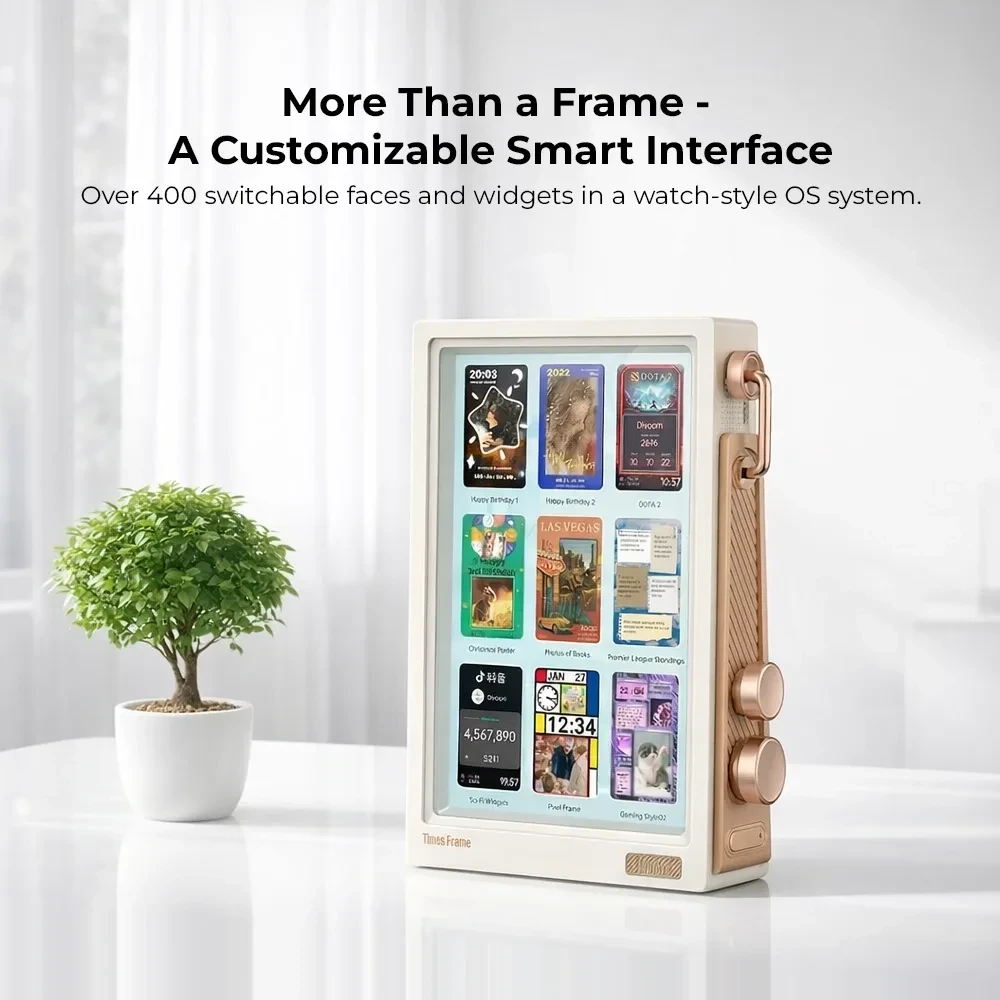
The Divoom Times Frame suits people who want to combine digital memories, creative artwork, and practical information in a single display. Its transparent screen, app-based customisation, and multiple colour options make it a distinctive addition to a home or office.
Customers shopping on 21GenX can also explore the platform's listed benefits:
- Free Shipping Across India
- Extra 2% Off on Prepaid Orders
- Easy Exchange and Hassle-Free Returns
- Authentic Products Guaranteed
- 100% Secure Payments and Trusted Checkout
These benefits support a convenient shopping experience while browsing distinctive products from global brands.
FAQ
Q. What is the Divoom Times Frame?
A. The Divoom Times Frame is a smart digital photo frame and desk display featuring a transparent IPS screen. It can display photos, videos, pixel art, digital clocks, weather information, calendars, and other supported widgets.
Q. What makes the Divoom Times Frame digital picture frame different?
A. Its transparent display creates a floating visual effect, while its smart features extend beyond standard photo playback. Users can customise the screen with pixel art, clocks, widgets, and productivity tools.
Q. What is the display size of the Divoom Times Frame?
A. The Divoom Times Frame features a 10.1-inch transparent IPS display.
Q. How much internal storage does the Divoom Times Frame have?
A. The device includes 64GB of built-in storage for photos, videos, and supported content.
Q. Can the Divoom Times Frame display videos?
A. Yes. The product supports photo and video playback, letting users display selected memories alongside still photos.
Q. Can I customise the Divoom Times Frame?
A. Yes. The Divoom app allows users to manage display content and explore supported customisation options, including pixel art, animations, clock faces, and widgets.
Q. Does the Divoom Times Frame need Wi-Fi?
A. The device supports Wi-Fi connectivity for app-based content management and supported smart features. Certain locally stored content may remain available without an active internet connection, depending on the feature being used.
Q. Is the Divoom Times Frame compatible with iPhone and Android phones?
A. The product information lists app support for iOS and Android devices. Check that your phone's operating system is compatible with the current Divoom app.
Q. Does the Divoom Times Frame have productivity features?
A. Yes. It includes productivity features such as a Pomodoro timer, reminders, and calendar tools, along with photo and art display.
Final Thoughts
The Divoom Times Frame brings digital photography, smart information, and creative display features together in a single device. Its transparent 10.1-inch IPS screen gives photos and artwork a distinctive floating appearance, while its 64GB storage, Wi-Fi connectivity, app control, and selection of widgets make it useful beyond traditional photo playback.
Whether you want to display favourite memories, personalise your workstation, keep useful information visible, or add a creative touch to your home décor, the Times Frame offers several ways to make a space feel more personal.
For shoppers looking for a divoom times frame smart desk display, a divoom times frame digital picture frame, or a divoom times frame in India, this product is worth exploring for its mix of digital memories, pixel art, and everyday smart-display functionality.